Scene Context Loader: a whole level in one click

Kugle has 43 scenes, and never runs one alone: a level is the core scene, the scene shared by all levels, the world it belongs to, and the level itself. Opening that by hand, scene after scene, in the right order, is a job nobody wants.
The scenes that load together are a context. The Scene Context Loader makes every context one button in Unity's toolbar: one click, and the whole context is there, camera included.
In the editor and in the game
The same buttons work in edit mode and in play mode. In the clip, the game is running: a click on a button jumps from the start screen to the login, to a race, to another race, to a level of the campaign. No menu to walk through to test level 12.
It offers to save your changes first, highlights the loaded context, and remembers what was unfolded in the hierarchy.
The camera is already in place
Each scene remembers its Scene view camera: position, rotation and zoom. Load a context and the camera lands where you left it in that level, not at the other end of the world. Saved every time a scene is saved or closed: nothing to set up.
On a small planet the view often ends upside down. The tool then flips the mouse drag, so the camera still turns the way you expect.
A context is a list of scenes
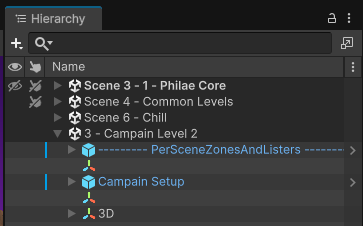
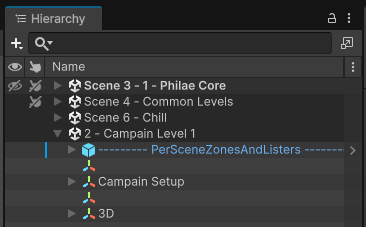
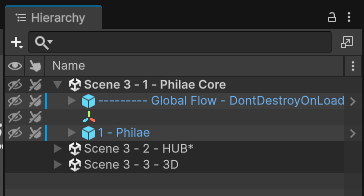
Two levels of the same world share three scenes and change the fourth. The hub is another set. The level designer works on one scene, the lighting artist on another, and nobody locks anybody's file.
A project can have several lists of contexts, each with its own toolbar: here another one of the game, and the one of the internal tools.


Keep a reference to a GameObject in other scenes
Unity does not let an object of one scene point to an object of another. Here it can: a GuidComponent on the object, a GuidReference in any script of another scene, and the link holds even when the scenes are closed and reopened.
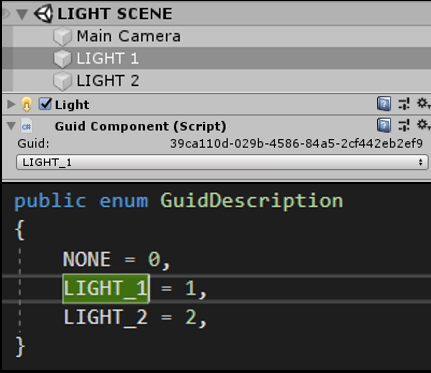
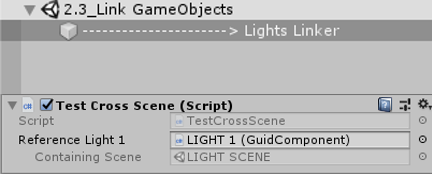
Cutting a game into scenes is only worth it if the scenes still talk to each other. Without links, every call from one scene to another goes through code and searches at runtime. With them, Event 2.0 calls a function on an object of another scene, set up in the inspector, in one line.
See Event 2.0 →