Changer la projection de la caméra
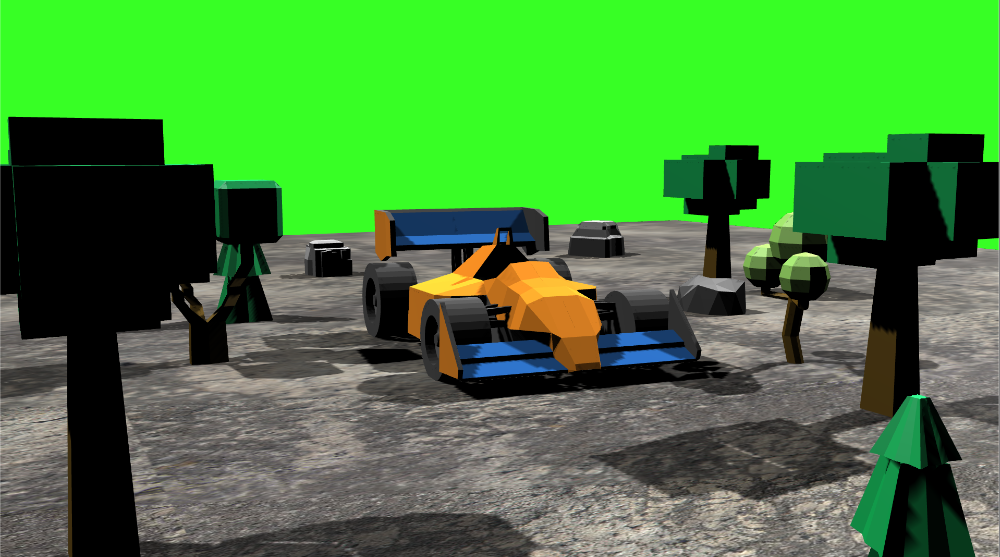
Les scripts suivants permettent de faire un lerp, avec easing, entre deux caméras. Le code applique un lerp séparément à chacun des paramètres suivants :
- le type de matrice de projection (orthographique ou perspective),
- la taille ou le champ de vision de la caméra, selon la projection,
- le ratio d’aspect,
- les plans de clipping far et near.
Démonstration
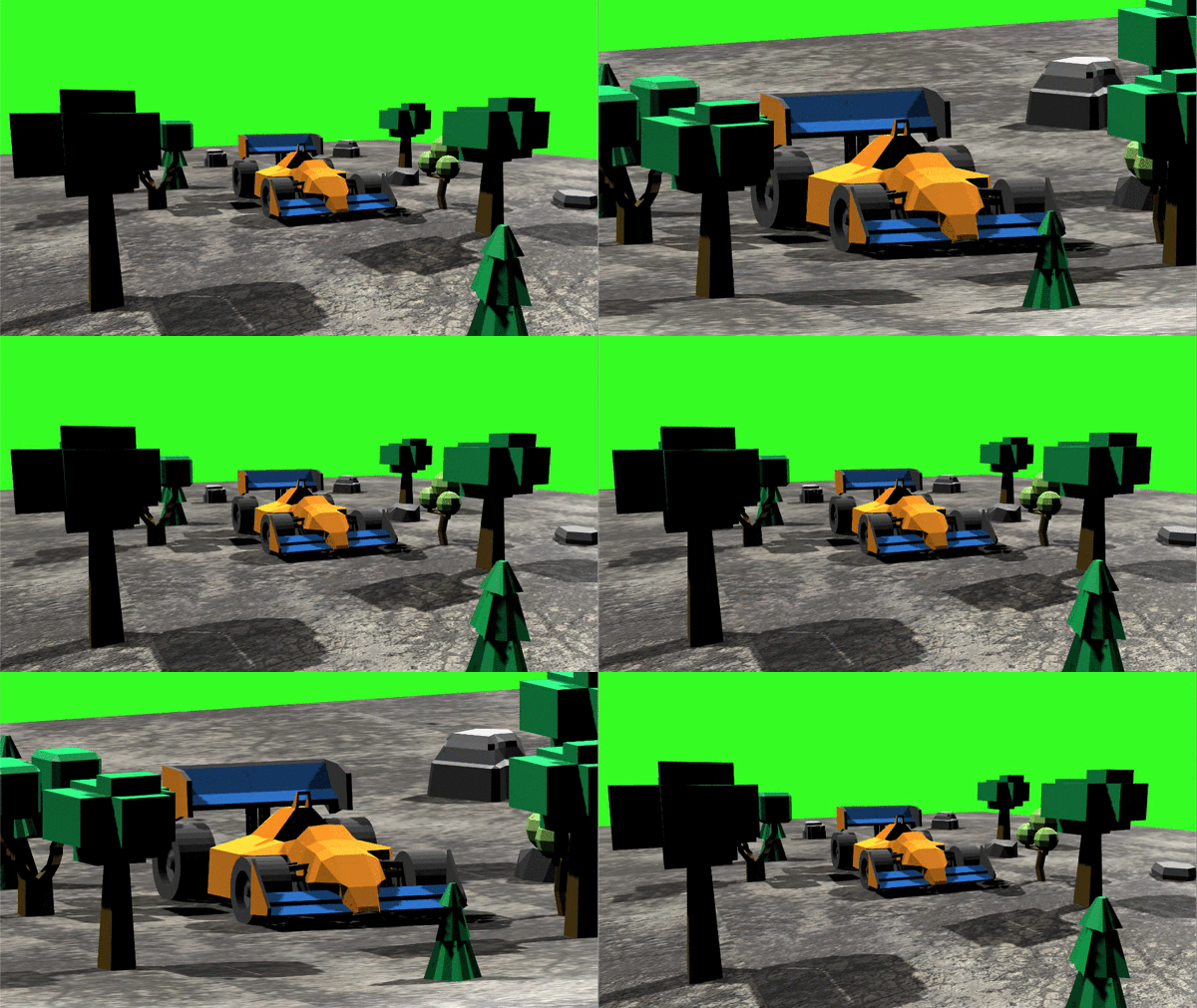
Voici le résultat de la transition entre une projection perspective et une projection orthographique, et inversement. Le résultat est très impressionnant.
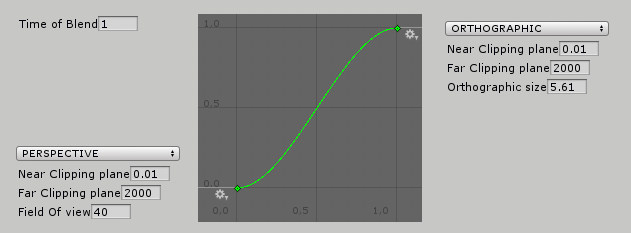
À partir des réglages de la caméra perspective, j’applique un lerp ease-in-out vers la caméra orthographique sur une durée donnée, avec une courbe d’animation et des maths vraiment simples.
Notez que vous pouvez aussi faire une transition entre deux caméras perspective aux réglages différents.
Changer le plan de clipping near
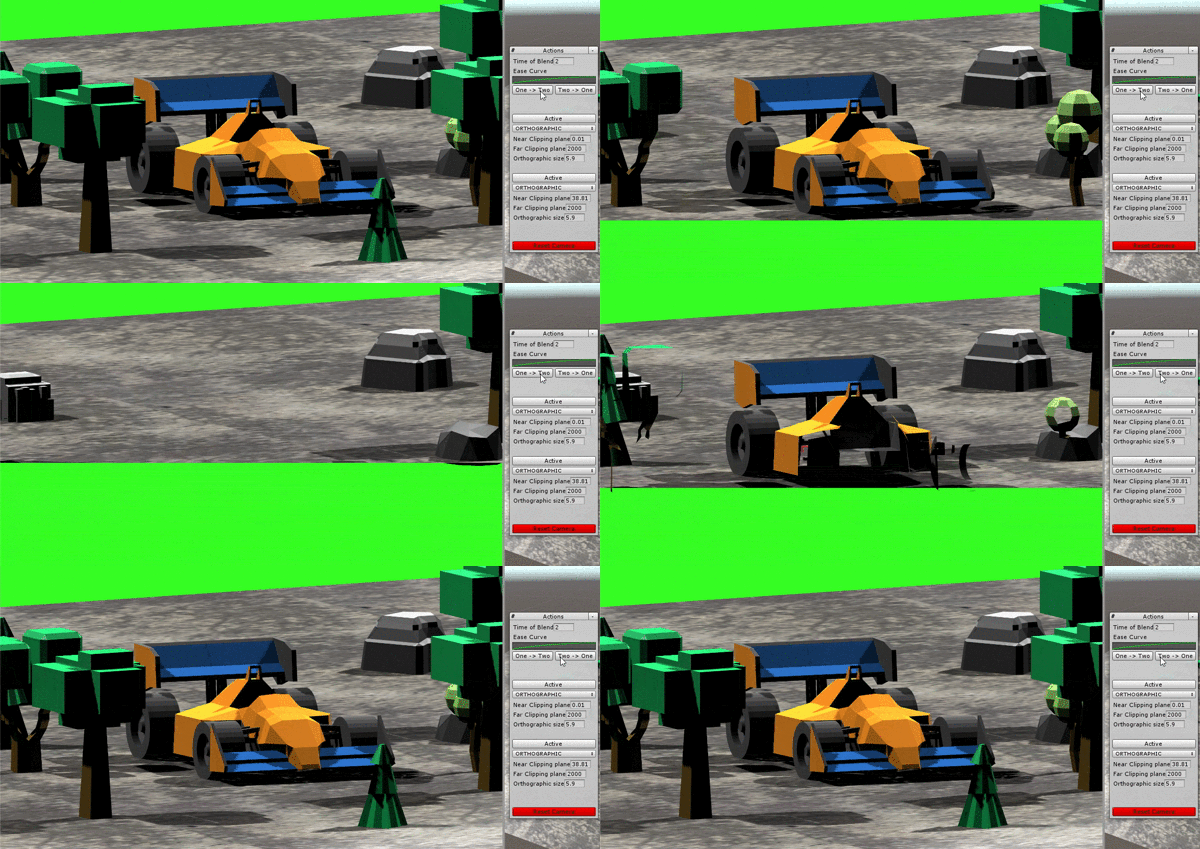
Ici, j’ai deux caméras identiques, où seul le plan de clipping near passe de 0.01 à 38.81.
Jouer avec les plans near et far donne des résultats intéressants. Pour aller plus loin, on pourrait changer le plan near pour un seul layer et pas les autres, avec deux caméras aux culling masks différents, plus un peu de superposition et d’écriture de textures.
Utilisation
Téléchargez les scripts ci-dessous et placez-les dans votre projet (dans le dossier Assets/).
PerspectiveSwitcher.cs
/// <summary>
/// MIT License - Copyright(c) 2019 Ugo Belfiore
/// </summary>

using UnityEngine;

namespace PerspectiveSwitcher
{
    /// <summary>
    /// this script contain the logic of the transition between 2 camera
    /// call ActiveCamera(CameraData cameraData) to activate the one you want
    /// call StartTransition to see the transition between CameraOne and CameraTwo
    /// call StartInverseTransition to see the opposite.
    /// call ResetCamera if you want to reset the projection matrix and the transition
    /// </summary>
    [RequireComponent(typeof(TransitionInformation)), ExecuteInEditMode]
    public class PerspectiveSwitcher : MonoBehaviour
    {
        [SerializeField, Tooltip("Reference of a Transition")]
        private TransitionInformation _transitionInformation;
        [SerializeField, Tooltip("The camera you want to apply the effect")]
        private Camera _mainCameraRef;

        private CameraData _prevCameraChoosen;
        private CameraData _nextCameraChoosen;
        private FrequencyChrono _frequencyChrono = new FrequencyChrono();

        private void Awake()
        {
            Init();
        }

        private void Init()
        {
            if (_mainCameraRef == null)
            {
                _mainCameraRef = Camera.main;
            }
            if (_transitionInformation == null)
            {
                _transitionInformation = gameObject.GetComponent<TransitionInformation>();
            }

            ActiveCamera(_transitionInformation.CameraOne);
        }


        /// <summary>
        /// Active a camera
        /// </summary>
        /// <param name="cameraData"></param>
        public void ActiveCamera(CameraData cameraData)
        {
            cameraData.Init();
            cameraData.SetCameraDatas(_mainCameraRef);
        }

        /// <summary>
        /// start the transition from one to two
        /// </summary>
        [ContextMenu("Start Transition")]
        public void StartTransition()
        {
            ExecuteTransition(_transitionInformation.CameraOne, _transitionInformation.CameraTwo, _transitionInformation.TimeBlend, _mainCameraRef);
        }

        /// <summary>
        /// start the transition from two to one
        /// </summary>
        [ContextMenu("Start Inverse Transition")]
        public void StartInverseTransition()
        {
            ExecuteTransition(_transitionInformation.CameraTwo, _transitionInformation.CameraOne, _transitionInformation.TimeBlend, _mainCameraRef);
        }

        /// <summary>
        /// Execute a transition between the first one, and the second one, in timeBlend seconds.
        /// </summary>
        /// <param name="first">first camera</param>
        /// <param name="second">second camera</param>
        /// <param name="timeBlend">time of the blend in seconds</param>
        public void ExecuteTransition(CameraData first, CameraData second, float timeBlend, Camera mainCamera)
        {
            _mainCameraRef = mainCamera;
            _frequencyChrono.StartChrono(timeBlend, false);

            _prevCameraChoosen = first;
            _nextCameraChoosen = second;

            _prevCameraChoosen.Init();
            _nextCameraChoosen.Init();

            _prevCameraChoosen.SetCameraDatas(_mainCameraRef);
        }

        [ContextMenu("Reset Camera")]
        public void ResetTransition()
        {
            _mainCameraRef.ResetProjectionMatrix();
            _frequencyChrono.Reset();
        }

        /// <summary>
        /// called even in play mode thanks to [ExecuteInEditMode]
        /// </summary>
        private void Update()
        {
            DoTransition();
        }

        /// <summary>
        /// called every update, do the transition if the timer is ready
        /// </summary>
        private void DoTransition()
        {
            SetFinalCameraIfChronoIsFinished();
            EvaluateLerpTransition();
        }

        /// <summary>
        /// called one, when the chrono is finished
        /// </summary>
        private void SetFinalCameraIfChronoIsFinished()
        {
            if (_frequencyChrono.IsFinished())
            {
                _nextCameraChoosen.SetCameraDatas(_mainCameraRef);
            }
        }

        /// <summary>
        /// called every frame, evaluate the transition between the 2 cameras matrix
        /// if the chrono is running
        /// </summary>
        private void EvaluateLerpTransition()
        {
            //called every frame the chrono is running
            if (_frequencyChrono.IsRunning())
            {
                float percentFromTime = _frequencyChrono.GetTimer() * 1 / _frequencyChrono.MaxTime;
                float evaluateLerp = _transitionInformation.CurveEase.Evaluate(percentFromTime);
                SetCameraLerp(_prevCameraChoosen, _nextCameraChoosen, evaluateLerp);
            }
        }

        /// <summary>
        /// set the data of the camera from the lerp of 2 cameraDatas
        /// </summary>
        /// <param name="one">CameraData From</param>
        /// <param name="two">CameraData To</param>
        /// <param name="evaluatedTime">time evaluated normalized, between 0 & 1</param>
        private void SetCameraLerp(CameraData one, CameraData two, float evaluatedTime)
        {
            _mainCameraRef.projectionMatrix = MatrixBlendData.DoMatrixTransition(evaluatedTime, one.Projection.GetSetuppedMatrix(), two.Projection.GetSetuppedMatrix());
        }
    }
}
TransitionInformation.cs
/// <summary>
/// MIT License - Copyright(c) 2019 Ugo Belfiore
/// </summary>

using System.Collections;
using System.Collections.Generic;
using UnityEngine;

namespace PerspectiveSwitcher
{
    public class TransitionInformation : MonoBehaviour
    {
        [Tooltip("Time of Blend")]
        public float TimeBlend = 2f;
        [Tooltip("Ease Curve")]
        public AnimationCurve CurveEase = ExtAnimationCurve.GetDefaultCurve(ExtAnimationCurve.EaseType.EASE_IN_OUT);


        [SerializeField, Tooltip("Matrix setting 1")]
        public CameraData CameraOne = new CameraData(MatrixBlendData.MatrixType.PERSPECTIVE);

        [SerializeField, Tooltip("Matrix setting 2")]
        public CameraData CameraTwo = new CameraData(MatrixBlendData.MatrixType.ORTHOGRAPHIC);
    }
}
CameraData.cs
/// <summary>
/// MIT License - Copyright(c) 2019 Ugo Belfiore
/// </summary>

using System;
using UnityEngine;

namespace PerspectiveSwitcher
{
    /// <summary>
    /// this class represent a camera.
    /// This camera have a projection, witch is the main settings of the camera
    /// </summary>
    [Serializable]
    public class CameraData
    {
        [SerializeField, Tooltip("Matrix settings")]
        public MatrixBlendData Projection;

        public CameraData(MatrixBlendData.MatrixType matrixType)
        {
            Projection = new MatrixBlendData(matrixType);
        }

        /// <summary>
        /// initialize the projection matrix
        /// </summary>
        public void Init()
        {
            Projection.Init();
        }

        /// <summary>
        /// call this to set the camera projection
        /// </summary>
        /// <param name="camera"></param>
        public void SetCameraDatas(Camera camera)
        {
            camera.projectionMatrix = Projection.GetSetuppedMatrix();
        }
    }
}
MatrixBlendData.cs
/// <summary>
/// MIT License - Copyright(c) 2019 Ugo Belfiore
/// </summary>

using UnityEngine;
using System;

namespace PerspectiveSwitcher
{
    /// <summary>
    /// this class containt the datas of the projection matrix
    /// </summary>
    [Serializable]
    public class MatrixBlendData
    {
        public enum MatrixType
        {
            PERSPECTIVE = 10,
            ORTHOGRAPHIC = 20
        }

        public MatrixType MatrixCurrentType = MatrixType.PERSPECTIVE;


        public float NearClippingPlane = .3f;
        public float FarClippingPlane = 1000f;
        public float FieldOfView = 60f;
        public float OrthographicSize = 5f;

        private Matrix4x4 _currentCalculatedMatrix;

        public MatrixBlendData(MatrixBlendData.MatrixType matrixType)
        {
            MatrixCurrentType = matrixType;
            Init();
        }

        /// <summary>
        /// construct the current matrix based on the class settings
        /// </summary>
        public void Init()
        {
            float aspectRatio = 16f / 9f;
            switch (MatrixCurrentType)
            {
                case MatrixType.ORTHOGRAPHIC:
                    _currentCalculatedMatrix = ExtMatrix.GetMatrixOrthographic(aspectRatio, OrthographicSize, NearClippingPlane, FarClippingPlane);
                    break;
                case MatrixType.PERSPECTIVE:
                    _currentCalculatedMatrix = ExtMatrix.GetMatrixPerspective(aspectRatio, FieldOfView, NearClippingPlane, FarClippingPlane);
                    break;
            }
        }

        /// <summary>
        /// reset the projection matrix of the camera
        /// </summary>
        /// <param name="camRef">main camera reference</param>
        public void ResetCameraToMatrix(Camera camRef)
        {
            switch (MatrixCurrentType)
            {
                case MatrixType.ORTHOGRAPHIC:
                    camRef.orthographic = true;
                    camRef.orthographicSize = OrthographicSize;
                    camRef.ResetProjectionMatrix();
                    break;
                case MatrixType.PERSPECTIVE:
                    camRef.orthographic = false;
                    camRef.fieldOfView = FieldOfView;
                    camRef.ResetProjectionMatrix();
                    break;
            }
        }

        /// <summary>
        /// get the final matrix corresponding to all the setting.
        /// You NEED to call Init() BEFORE calling this function
        /// </summary>
        /// <returns></returns>
        public Matrix4x4 GetSetuppedMatrix()
        {
            return (_currentCalculatedMatrix);
        }

        /// <summary>
        /// From a previous and a next matrice, get a lerped one by an evaluated time
        /// </summary>
        /// <param name="timeEvaluated">time of the lerp</param>
        /// <param name="prevMatrix">start lerp matrix</param>
        /// <param name="nextMatrix">end lerp matrix</param>
        /// <param name="curve">curve if we want to add an ease to the lerp</param>
        /// <returns>return the current lerped matrix</returns>
        public static Matrix4x4 DoMatrixTransition(float timeEvaluated, Matrix4x4 prevMatrix, Matrix4x4 nextMatrix)
        {
            return (ExtMatrix.MatrixLerp(prevMatrix, nextMatrix, timeEvaluated));
        }
    }
}
ExtMatrix.cs
/// <summary>
/// MIT License - Copyright(c) 2019 Ugo Belfiore
/// </summary>

using UnityEngine;

namespace PerspectiveSwitcher
{
    public static class ExtMatrix
    {
        /// <summary>
        /// apply a lerp between the 2 matrix by time
        /// </summary>
        /// <returns>Lerped matrix</returns>
        public static Matrix4x4 MatrixLerp(Matrix4x4 from, Matrix4x4 to, float time)
        {
            Matrix4x4 ret = new Matrix4x4();
            for (int i = 0; i < 16; i++)
                ret[i] = Mathf.Lerp(from[i], to[i], time);
            return ret;
        }

        /// <summary>
        /// get an Orthographic matrix
        /// </summary>
        /// <param name="aspect">aspect ratio</param>
        /// <param name="orthographicSize">size of the orthigraphic projection</param>
        /// <param name="nearClippingPlane">near</param>
        /// <param name="farClippingPlane">far</param>
        /// <returns>Orthographic matrix</returns>
        public static Matrix4x4 GetMatrixOrthographic(float aspect, float orthographicSize, float nearClippingPlane, float farClippingPlane)
        {
            return (Matrix4x4.Ortho(-orthographicSize * aspect, orthographicSize * aspect, -orthographicSize, orthographicSize, nearClippingPlane, farClippingPlane));
        }

        /// <summary>
        /// get an Perspective matrix
        /// </summary>
        /// <param name="aspect">aspect ratio</param>
        /// <param name="fieldOfView">field Of View of the camera</param>
        /// <param name="nearClippingPlane">near</param>
        /// <param name="farClippingPlane">far</param>
        /// <returns>Perspective matrix</returns>
        public static Matrix4x4 GetMatrixPerspective(float aspect, float fieldOfView, float nearClippingPlane, float farClippingPlane)
        {
            return (Matrix4x4.Perspective(fieldOfView, aspect, nearClippingPlane, farClippingPlane));
        }
    }
}
ExtAnimationCurve.cs
/// <summary>
/// MIT License - Copyright(c) 2019 Ugo Belfiore
/// </summary>

using UnityEngine;

namespace PerspectiveSwitcher
{
    public static class ExtAnimationCurve
    {
        public enum EaseType
        {
            LINEAR,
            EASE_IN_OUT,
        }

        /// <summary>
        /// return a color from a string
        /// </summary>
        public static float GetMaxValue(this AnimationCurve animationCurve, ref int index)
        {
            if (animationCurve.length == 0)
            {
                Debug.LogWarning("no keys");
                index = -1;
                return (0);
            }

            index = 0;
            float maxValue = animationCurve[0].value;
            for (int i = 1; i < animationCurve.length; i++)
            {
                if (animationCurve[i].value > maxValue)
                {
                    maxValue = animationCurve[i].value;
                    index = i;
                }
            }
            return (maxValue);
        }

        /// <summary>
        /// return a color from a string
        /// </summary>
        public static float GetMinValue(this AnimationCurve animationCurve, ref int index)
        {
            if (animationCurve.length == 0)
            {
                Debug.LogWarning("no keys");
                index = -1;
                return (0);
            }

            index = 0;
            float minValue = animationCurve[0].value;
            for (int i = 1; i < animationCurve.length; i++)
            {
                if (animationCurve[i].value < minValue)
                {
                    minValue = animationCurve[i].value;
                    index = i;
                }
            }
            return (minValue);
        }

        public static AnimationCurve GetDefaultCurve(EaseType easeType = EaseType.LINEAR)
        {
            switch (easeType)
            {
                case EaseType.LINEAR:
                    AnimationCurve curveLinear = AnimationCurve.Linear(0, 0, 1, 1);// new AnimationCurve(new Keyframe(0, 0), new Keyframe(1, 1));
                                                                                   //curveLinear.postWrapMode = WrapMode.Clamp;
                    return (curveLinear);
                case EaseType.EASE_IN_OUT:
                    AnimationCurve curveEased = AnimationCurve.EaseInOut(0, 0, 1, 1);
                    return (curveEased);
            }
            return (new AnimationCurve());
        }
    }
}
FrequencyChrono.cs
/// <summary>
/// MIT License - Copyright(c) 2019 Ugo Belfiore
/// </summary>

using UnityEngine;

namespace PerspectiveSwitcher
{
    /// <summary>
    /// Create a Chrono, who start at 0, and increment over time.
    ///
    /// Use: create a new FrequencyChrono:
    /// private FrequencyChrono _chrono = new FrequencyChrono();
    ///
    /// Start it when you want:
    /// _chrono.StartChono();
    ///
    /// You can give it a max time (it will go from 0 to 5, and stay at 5)
    /// _chrono.StartChrono(5f);
    ///
    /// You can even ask it to loop:
    /// _chrono.StartChrono(5f, true);
    ///
    /// at any time you want, get the current value of the Chrono:
    /// _chrono.GetTimer();
    ///
    /// if you want to test if the Chrono is currently running
    /// if (_chrono.IsRunning())
    ///
    /// if you have set a maxTime, and you want to test if the _chrono started and finished:
    /// if (_chrono.IsFinished())
    ///
    /// Sometime it nice to know if the timer is not initialize, or finished, to start it again, you can do it with this:
    /// if (_chrono.IsNotStartedOrFinished())
    /// </summary>
    [System.Serializable]
    public class FrequencyChrono
    {
        private float _timeStart = 0;
        private bool _loop = false;
        private float _maxTime = -1;
        public float MaxTime { get { return (_maxTime); } set { _maxTime = value; } }
        private float _saveTime = 0;
        private bool _isInPause = false;
        public bool IsInPause { get { return (_isInPause); } }
        private bool _isFinishedOrNeverStarted = true;
        private bool _isStarted = false;
        public bool IsStarted { get { return (_isStarted); } }
        private bool _useUnscaleTime = false;

        private float _currentTime;

        #region public functions

        /// <summary>
        /// Start the Chrono
        /// </summary>
        /// <param name="useUnscaleTime">define if we want to use a timeScale-independent timer or not</param>
        public void StartChrono(bool useUnscaleTime = false)
        {
            _useUnscaleTime = useUnscaleTime;
            _timeStart = GetTimeScaledOrNot();
            _loop = false;
            _isInPause = false;
            _maxTime = -1;
            _isFinishedOrNeverStarted = true;
            _isStarted = true;
        }

        /// <summary>
        /// Start the Chrono, with a maxTime. The chrono will stop at the max time,
        /// or loop  if needed.
        /// </summary>
        /// <param name="maxTime">max time in seconds</param>
        /// <param name="loop">do the chrono loop modulo maxTime ?</param>
        /// <param name="useUnscaleTime">define if we want to use a timeScale-independent timer or not</param>
        public void StartChrono(float maxTime, bool loop, bool useUnscaleTime = false)
        {
            //if there is a negative maxTime, don't use it, and simply advance forward the timer without stopping
            if (maxTime < 0)
            {
                StartChrono(useUnscaleTime);
                return;
            }

            _useUnscaleTime = useUnscaleTime;
            _timeStart = GetTimeScaledOrNot();
            _loop = loop;
            _maxTime = maxTime;
            _isInPause = false;
            _isFinishedOrNeverStarted = true;
            _isStarted = true;
        }

        /// <summary>
        /// return the current timer, in seconds
        /// eg: return 125.95 if the timer is at 2 minutes, 5 seconds and 95 miliseconds
        /// </summary>
        /// <param name="managePause">Should always be true, return the time when we were in pause</param>
        /// <returns>return the time in seconds eg: return 125.95 if the timer is at 2 minutes, 5 seconds and 95 miliseconds</returns>
        public float GetTimer(bool managePause = true)
        {
            if (!_isStarted)
            {
                return (0);
            }

            if (managePause && _isInPause)
            {
                return (_saveTime);
            }

            _currentTime = GetTimeScaledOrNot() - _timeStart;

            if (_loop)
            {
                if (_currentTime > _maxTime)
                {
                    _currentTime -= _maxTime;
                }
                _currentTime %= _maxTime;
            }
            else if (_maxTime != -1 && Mathf.Abs(_currentTime) > _maxTime)
            {
                _currentTime = _maxTime * Mathf.Sign(_currentTime);
            }

            return (_currentTime);
        }

        /// <summary>
        /// Is the Chrono started, but not finished yet ?
        /// if the Start options loop is set to false, and if the chrono is started,
        ///     it will return true as long as you don't reset it.
        /// </summary>
        public bool IsRunning()
        {
            if (IsStarted && _isInPause)
            {
                return (true);
            }

            if (IsStarted && (!IsTimeExceedMaxTime() || _loop))
            {
                return (true);
            }
            return (false);
        }

        /// <summary>
        /// Is the Chrono not started, or started and over ?
        /// </summary>
        /// <returns></returns>
        public bool IsNotRunning()
        {
            return (!IsRunning());
        }

        /// <summary>
        /// is the timer not started, or started and over, and not in pause
        /// </summary>
        /// <returns>return true if the chrono is not started, or started and over</returns>
        public bool IsNotStartedOrFinished()
        {
            if (!IsStarted)
            {
                return (true);
            }
            if (_isInPause)
            {
                return (false);
            }

            //if _maxTime is at 1, that mean we do'nt have any stop time, we will continue forever.
            if (_maxTime == -1)
            {
                return (false);
            }

            _currentTime = GetTimeScaledOrNot() - _timeStart;
            return (Mathf.Abs(_currentTime) >= _maxTime);
        }

        /// <summary>
        /// return true if the timer is finished (and reset the timer)
        ///
        /// if the parametter resetIfFinished si set to true, the chrono will
        /// reset if the coolDown is finished. That's mean if we test IsFinished() again, it will return false
        ///
        /// if the timer never started, return false;
        /// if the timer is in looping mode, return false;
        /// </summary>
        /// <param name="resetIfFinished">if true, the coolDown is reset. That's mean if we test IsFinished() again, it will return false</param>
        /// <returns></returns>
        public bool IsFinished(bool resetIfFinished = true)
        {
            if (_loop)
            {
                return (false);
            }

            if (!IsStarted)
            {
                return (false);
            }

            if (_maxTime == -1)
            {
                return (false);
            }

            if (IsTimeExceedMaxTime())
            {
                if (resetIfFinished)
                {
                    Reset();
                }
                return (true);
            }
            //Debug.Log("ic not finished...");
            return (false);
        }

        /// <summary>
        /// move in time forward manually by a certain amount
        /// </summary>
        /// <param name="jumpInTime">jump time in second</param>
        public void ManualForward(float jumpInTime = 0.016f)
        {
            _timeStart -= jumpInTime;
            _saveTime += jumpInTime;
        }

        /// <summary>
        /// move in time backward
        /// </summary>
        /// <param name="jumpInTime">jump time in second</param>
        public void ManualBackward(float jumpInTime = 0.016f)
        {
            _timeStart += jumpInTime;
            _saveTime -= jumpInTime;
        }

        /// <summary>
        /// set the Chrono to pause
        /// </summary>
        public void Pause()
        {
            if (_isInPause)
            {
                return;
            }

            _saveTime = GetTimer(false);
            _isInPause = true;
        }

        /// <summary>
        /// Resume the timer, assuming it was in pause previously.
        /// </summary>
        public void Resume()
        {
            if (!IsInPause)
            {
                return;
            }

            _isInPause = false;
            _timeStart = GetTimeScaledOrNot() - _saveTime;
        }

        /// <summary>
        /// reset the chrono to 0 & all the options
        /// </summary>
        public void Reset()
        {
            _timeStart = GetTimeScaledOrNot();
            _loop = false;
            _isInPause = false;
            _isFinishedOrNeverStarted = true;
            _isStarted = false;
        }

        #endregion

        #region private functions

        /// <summary>
        /// get the current time, scaled or unscaled depending on the Start options
        /// Note if you don't have TimeEditor, you can use the normla Time of Unity
        /// </summary>
        /// <returns>return the current timer of unity</returns>
        private float GetTimeScaledOrNot()
        {
            return ((_useUnscaleTime) ? Time.unscaledTime : Time.time);
        }

        private bool IsTimeExceedMaxTime()
        {
            if (_maxTime < 0)
            {
                return (false);
            }
            return (Mathf.Abs(GetTimeScaledOrNot()) >= _timeStart + _maxTime);
        }

        #endregion


    }
}
Créez ensuite un GameObject vide dans votre scène et ajoutez-lui le script PerspectiveSwitcher.cs (il faut une caméra dans la scène). Un composant TransitionInformation.cs sera ajouté automatiquement.
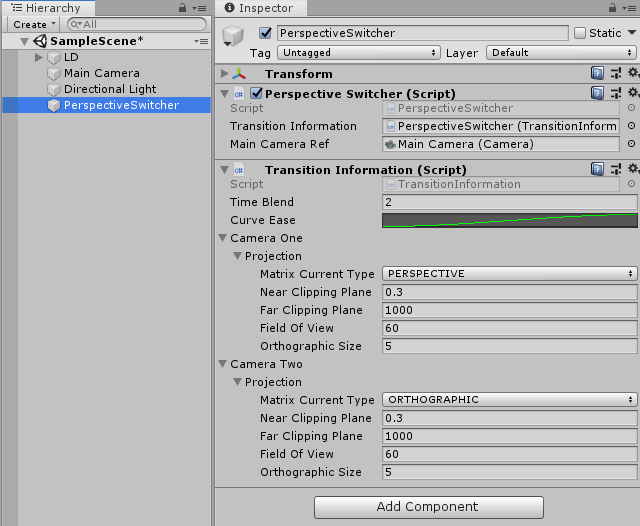
Vous pouvez alors jouer avec les différentes valeurs du script TransitionInformation.cs.
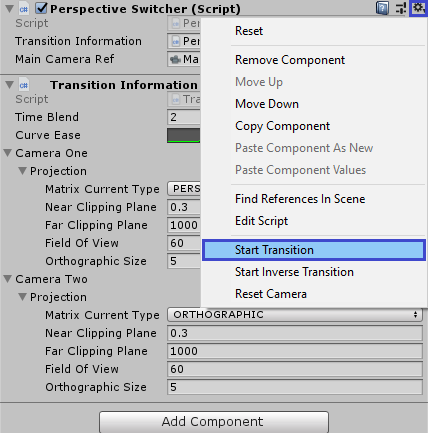
Lancez ensuite Play, cliquez sur l’icône de réglages du composant PerspectiveSwitcher.cs, puis sur la fonction Start Transition pour tester le résultat.
Fonctions principales
Une caméra est représentée par la classe CameraData.cs. Créez-en deux dans le code comme ceci :
[SerializeField, Tooltip("Matrix setting 1")]
public CameraData CameraOne = new CameraData(MatrixBlendData.MatrixType.PERSPECTIVE);

[SerializeField, Tooltip("Matrix setting 2")]
public CameraData CameraTwo = new CameraData(MatrixBlendData.MatrixType.ORTHOGRAPHIC);
Activez l’une d’elles avec cette fonction :
ActiveCamera(CameraOne);
Lancez une transition avec la fonction ExecuteTransition() (un exemple se trouve dans la fonction StartTransition() du script PerspectiveSwitcher.cs) :
ExecuteTransition(PerspectiveCamera, OrthographicCamera, 2f, _mainCamera);
Réinitialiser la transition en cours :
ResetTransition();
Comment ça marche
À partir des réglages d’une caméra, j’extrais les paramètres et crée une matrice avec les fonctions ExtMatrix.GetMatrixOrthographic(...) ou ExtMatrix.GetMatrixPerspective(...).
float aspectRatio = 16f / 9f;
switch (MatrixCurrentType)
{
    case MatrixType.ORTHOGRAPHIC:
        _currentCalculatedMatrix = ExtMatrix.GetMatrixOrthographic(aspectRatio, OrthographicSize, NearClippingPlane, FarClippingPlane);
        break;
    case MatrixType.PERSPECTIVE:
        _currentCalculatedMatrix = ExtMatrix.GetMatrixPerspective(aspectRatio, FieldOfView, NearClippingPlane, FarClippingPlane);
        break;
}
Notez que le ratio d’aspect est codé en dur ici. À vous de choisir le bon ratio pour votre jeu.
Vous pouvez même essayer un lerp entre deux ratios d’aspect différents, en ajoutant un réglage de ratio à CameraData. Ça donne des résultats intéressants.
Ensuite, à chaque frame dans Update(), j’évalue la transition entre les deux matrices de caméra :
/// <summary>
/// called every frame, evaluate the transition between the 2 camera matrix
/// if the chrono is running
/// </summary>
private void EvaluateLerpTransition()
{
    //called every frame the chrono is running
    if (_frequencyChrono.IsRunning())
    {
        float percentFromTime = _frequencyChrono.GetTimer() * 1 / _frequencyChrono.MaxTime;
        float evaluateLerp = _transitionInformation.CurveEase.Evaluate(percentFromTime);
        SetCameraLerp(_prevCameraChoosen, _nextCameraChoosen, evaluateLerp);
    }
}

/// <summary>
/// set the data of the camera from the lerp of 2 cameraDatas
/// </summary>
/// <param name="one">CameraData From</param>
/// <param name="two">CameraData To</param>
/// <param name="evaluatedTime">time evaluated normalized, between 0 & 1</param>
private void SetCameraLerp(CameraData one, CameraData two, float evaluatedTime)
{
    _mainCameraRef.projectionMatrix = MatrixBlendData.DoMatrixTransition(evaluatedTime, one.Projection.GetSetuppedMatrix(), two.Projection.GetSetuppedMatrix());
}
À partir du chrono en cours, je calcule l’avancement de la transition, entre 0 et 1.
Je peux alors évaluer la courbe d’easing à ce point grâce à CurveEase.Evaluate(percentFromTime);.
La dernière étape se trouve dans la fonction MatrixBlendData.DoMatrixTransition(...), qui appelle ExtMatrix.MatrixLerp(...) :
/// <summary>
/// apply a lerp between the 2 matrix by time
/// </summary>
/// <returns>Lerped matrix</returns>
public static Matrix4x4 MatrixLerp(Matrix4x4 from, Matrix4x4 to, float time)
{
    Matrix4x4 ret = new Matrix4x4();
    for (int i = 0; i < 16; i++)
        ret[i] = Mathf.Lerp(from[i], to[i], time);
    return ret;
}
Comme vous le voyez, je fais simplement une interpolation linéaire de chaque valeur de la matrice.
Ce genre d’interpolation linéaire de matrices fonctionne, mais ne donne pas un résultat linéaire à l’écran. Pour compenser, il faut ajuster la courbe fournie dans les réglages de transition.
Fichiers source
- Télécharger PerspectiveSwitcher.cs
- Télécharger TransitionInformation.cs
- Télécharger CameraData.cs
- Télécharger MatrixBlendData.cs
- Télécharger ExtMatrix.cs
- Télécharger ExtAnimationCurve.cs
- Télécharger FrequencyChrono.cs
Voir aussi
- Chronos et cooldowns : pour tous vos timers et cooldowns dans Unity. Fini les
Invoke(), les coroutines ou les vérifications de temps à la main dansUpdate(). - Time, TimeScale and DeltaTime in the editor : une classe
TimeEditorqui reproduit le comportement de la classeTimeen mode édition. Utile pour les outils qui ont besoin de timers et de ralentis. - Déplacer un parent sans bouger ses enfants : déplacer, tourner et redimensionner un GameObject sans toucher à ses enfants.