Chronos et cooldowns
Chaque fois que vous avez besoin d’un timer, utilisez un timer maison comme celui-ci. Les méthodes Invoke() et les coroutines ne sont pas la meilleure solution pour un simple timer :
- d’abord, elles consomment du calcul et de la mémoire pour rien ;
- ensuite, elles rendent le code plus confus ;
- enfin, impossible de mettre en pause, de boucler…
La solution : un simple script de chrono qu’on peut lancer, mettre en pause et faire boucler. J’ai créé deux classes pour deux besoins légèrement différents :
FrequencyChrono: le temps part de 0 et avance (ou recule, si votre timeScale est négatif !)FrequencyCoolDown: il part de X secondes et descend vers 0
Dans les deux scripts, j’utilise la classe TimeEditor pour que les timers fonctionnent en mode édition comme en mode Play (plus d’infos ici). De plus, TimeEditor permet d’avoir un timeScale négatif. En clair : remonter le temps !
Si vous ne voulez pas l’utiliser, remplacez simplement TimeEditor par Time.
Ce que ça fait
FrequencyChrono
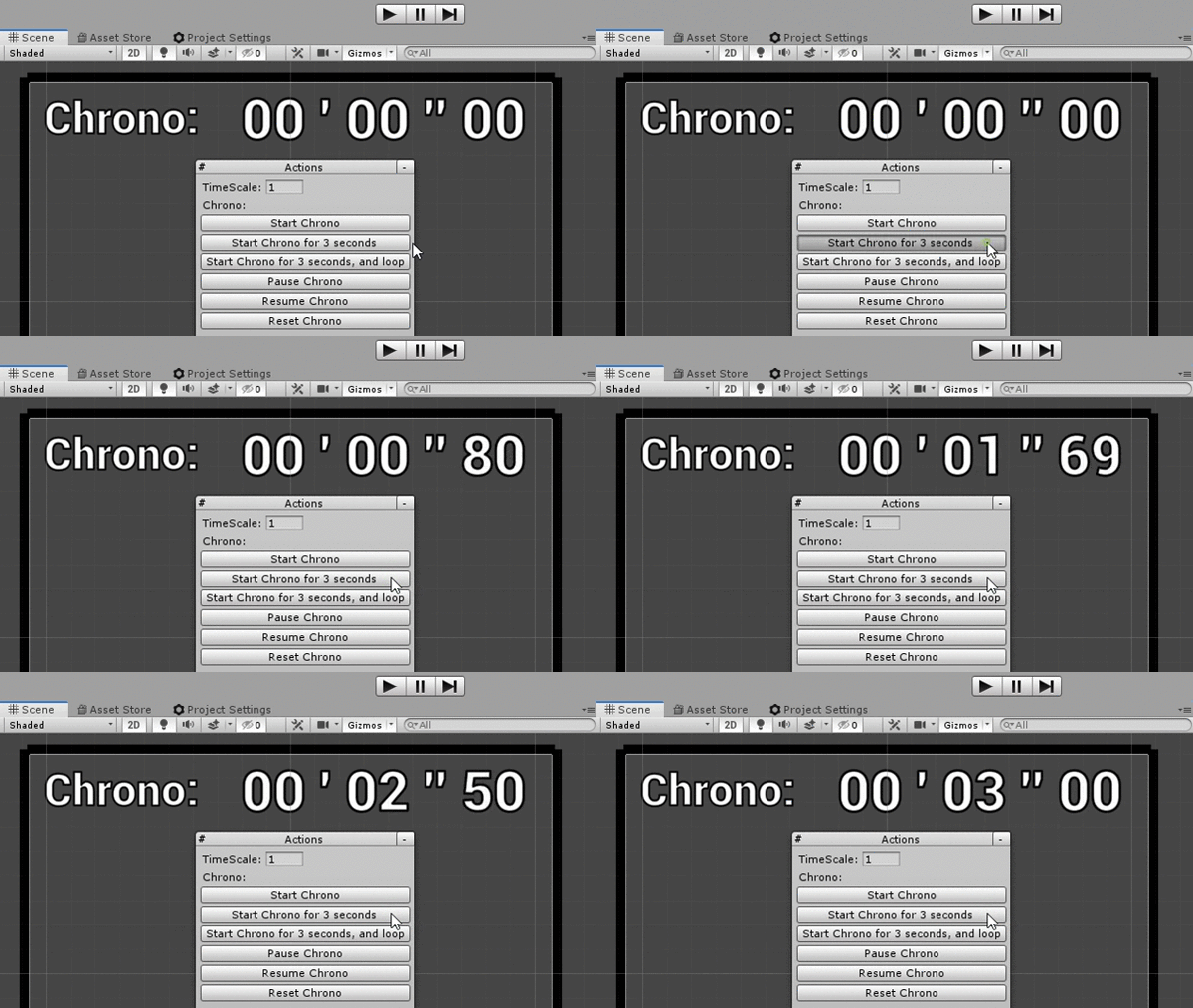
Un chrono dont le temps part de 0 et avance.
- Il gère le
timeScale, dans l’éditeur et en mode Play - Il peut être mis en pause et relancé
- Il peut boucler à partir d’un
MaxTimedonné, ou s’arrêter si besoin - On peut l’avancer ou le reculer à la main si besoin
- Il peut reculer si le timeScale est négatif
FrequencyCoolDown
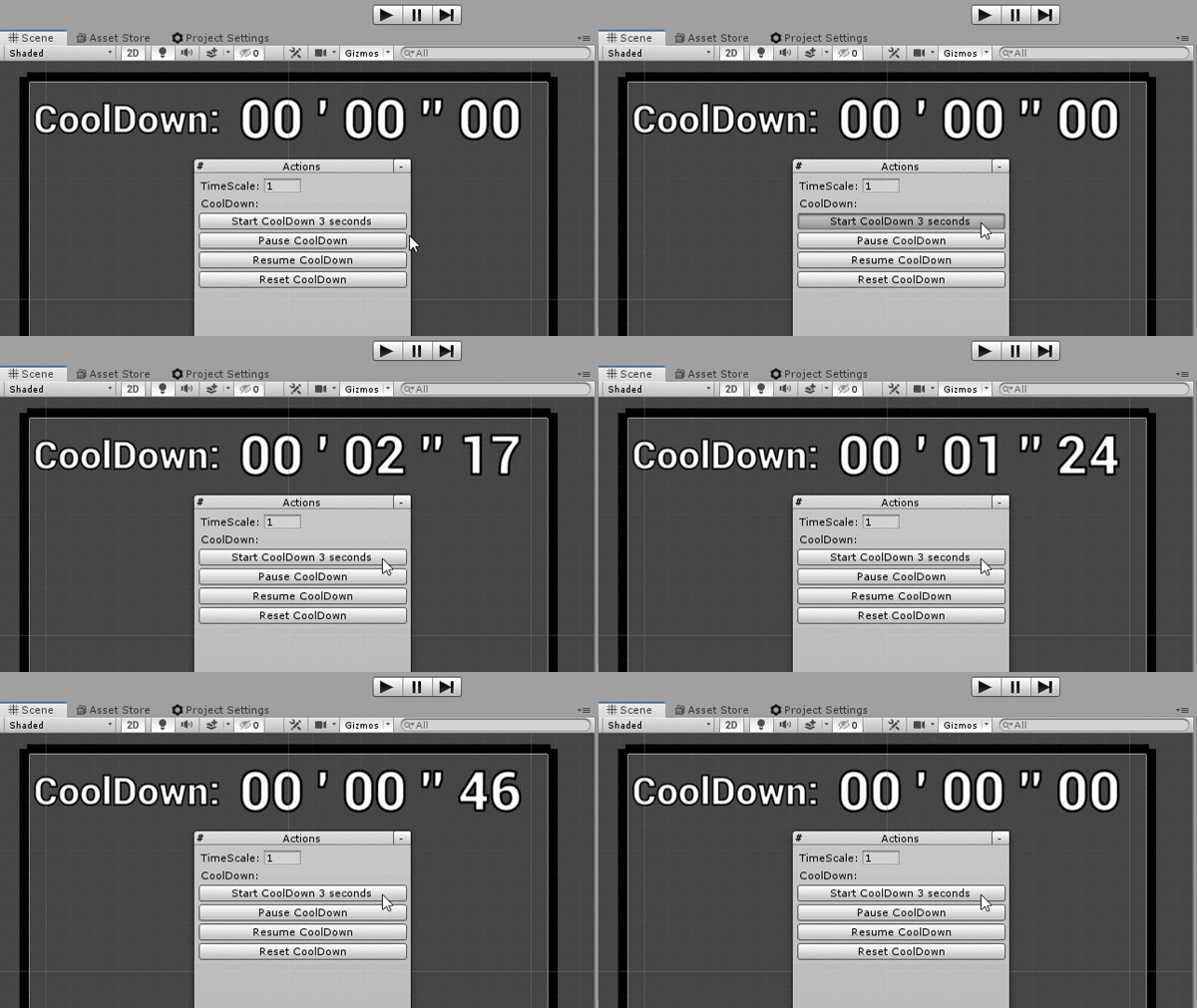
Un cooldown qui part de X secondes et descend vers 0.
- Il gère le
timeScale, dans l’éditeur et en mode Play - Il peut être mis en pause et relancé
Utilisation
Voici des exemples pour les deux classes ; utilisez celle qui vous convient le mieux. D’abord, il faut instancier le timer :
private FrequencyCoolDown _coolDown = new FrequencyCoolDown();
private FrequencyChrono _chrono = new FrequencyChrono();
À tout moment, dans un script d’éditeur ou un script classique, vous pouvez lancer les timers :
_coolDown.StartCoolDown(5f);    //it will go from 5 to 0

_chrono.StartChrono();          //it will go from 0 to infinite
_chrono.StartChrono(5f);        //it will go from 0 to 5, and stay at 5
_chrono.StartChrono(5f, true);  //it will loop from 0 to 5
À tout moment, vous pouvez récupérer le temps actuel :
_coolDown.GetTimer();
_chrono.GetTimer();
Pour tester si les timers sont en cours :
if (_coolDown.IsRunning()) {}
if (_chrono.IsRunning()) {}
Pour tester si les timers ont démarré et sont terminés :
if (_coolDown.IsFinished()) {}
if (_chrono.IsFinished()) {}
Scripts
FrequencyChrono.cs
/// <summary>
/// MIT License - Copyright(c) 2019 Ugo Belfiore
/// </summary>

using UnityEngine;

/// <summary>
/// Create a Chrono, who start at 0, and increment over time.
///
/// Use: create a new FrequencyChrono:
/// private FrequencyChrono _chrono = new FrequencyChrono();
///
/// Start it when you want:
/// _coolDown.StartChono();
///
/// You can give it a max time (it will go from 0 to 5, and stay at 5)
/// _coolDown.StartChrono(5f);
///
/// You can even ask it to loop:
/// _coolDown.StartChrono(5f, true);
///
/// at any time you want, get the current value of the Chrono:
/// _coolDown.GetTimer();
///
/// if you want to test if the Chrono is currently running
/// if (_coolDown.IsRunning())
///
/// if you have set a maxTime, and you want to test if the _coolDown is Started, and Finished:
/// if (_coolDown.IsFinished())
///
/// Sometime it nice to know if the timer is not initialize, or finished, to start it again, you can do it with this:
/// if (_coolDown.IsNotStartedOrFinished())
/// </summary>
[System.Serializable]
public class FrequencyChrono
{
    private float _timeStart = 0;
    private bool _loop = false;
    private float _maxTime = -1;
    public float MaxTime { get { return (_maxTime); } set { _maxTime = value; } }
    private float _saveTime = 0;
    private bool _isInPause = false;
    public bool IsInPause {  get {  return (_isInPause); } }
    private bool _isFinishedOrNeverStarted = true;
    private bool _isStarted = false;
    public bool IsStarted { get { return (_isStarted); } }
    private bool _useUnscaleTime = false;

    private float _currentTime;

    #region public functions

    /// <summary>
    /// Start the Chrono
    /// </summary>
    /// <param name="useUnscaleTime">define if we want to use a timeScale-independent timer or not</param>
    public void StartChrono(bool useUnscaleTime = false)
    {
        _useUnscaleTime = useUnscaleTime;
        _timeStart = GetTimeScaledOrNot();
        _loop = false;
        _isInPause = false;
        _maxTime = -1;
        _isFinishedOrNeverStarted = true;
        _isStarted = true;
    }

    /// <summary>
    /// Start the Chrono, with a maxTime. The chrono will stop at the max time,
    /// or loop  if needed.
    /// </summary>
    /// <param name="maxTime">max time in seconds</param>
    /// <param name="loop">do the chrono loop modulo maxTime ?</param>
    /// <param name="useUnscaleTime">define if we want to use a timeScale-independent timer or not</param>
    public void StartChrono(float maxTime, bool loop, bool useUnscaleTime = false)
    {
        //if there is a negative maxTime, don't use it, and simply advance forward the timer without stopping
        if (maxTime < 0)
        {
            StartChrono(useUnscaleTime);
            return;
        }

        _useUnscaleTime = useUnscaleTime;
        _timeStart = GetTimeScaledOrNot();
        _loop = loop;
        _maxTime = maxTime;
        _isInPause = false;
        _isFinishedOrNeverStarted = true;
        _isStarted = true;
    }

    /// <summary>
    /// return the current timer, in seconds
    /// eg: return 125.95 if the timer is at 2 minutes, 5 seconds and 95 miliseconds
    /// </summary>
    /// <param name="managePause">Should always be true, return the time when we were in pause</param>
    /// <returns>return the time in seconds eg: return 125.95 if the timer is at 2 minutes, 5 seconds and 95 miliseconds</returns>
    public float GetTimer(bool managePause = true)
    {
        if (!_isStarted)
        {
            return (0);
        }

        if (managePause && _isInPause)
        {
            return (_saveTime);
        }

        _currentTime = GetTimeScaledOrNot() - _timeStart;

        if (_loop)
        {
            if (_currentTime > _maxTime)
            {
                _currentTime -= _maxTime;
            }
            _currentTime %= _maxTime;
        }
        else if (_maxTime != -1 && Mathf.Abs(_currentTime) > _maxTime)
        {
            _currentTime = _maxTime * Mathf.Sign(_currentTime);
        }

        return (_currentTime);
    }

    /// <summary>
    /// Is the Chrono started, but not finished yet ?
    /// if the Start options loop is set to false, and if the chrono is started,
    ///     it will return true as long as you don't reset it.
    /// </summary>
    public bool IsRunning()
    {
        if (IsStarted && _isInPause)
        {
            return (true);
        }

        if (IsStarted && (!IsTimeExceedMaxTime() || _loop))
        {
            return (true);
        }
        return (false);
    }

    /// <summary>
    /// Is the Chrono not started, or started and over ?
    /// </summary>
    /// <returns></returns>
    public bool IsNotRunning()
    {
        return (!IsRunning());
    }

    /// <summary>
    /// is the timer not started, or started and over, and not in pause
    /// </summary>
    /// <returns>return true if the chrono is not started, or started and over</returns>
    public bool IsNotStartedOrFinished()
    {
        if (!IsStarted)
        {
            return (true);
        }
        if (_isInPause)
        {
            return (false);
        }

        //if _maxTime is at 1, that mean we do'nt have any stop time, we will continue forever.
        if (_maxTime == -1)
        {
            return (false);
        }

        _currentTime = GetTimeScaledOrNot() - _timeStart;
        return (Mathf.Abs(_currentTime) >= _maxTime);
    }

    /// <summary>
    /// return true if the timer is finished (and reset the timer)
    ///
    /// if the parametter resetIfFinished si set to true, the chrono will
    /// reset if the coolDown is finished. That's mean if we test IsFinished() again, it will return false
    ///
    /// if the timer never started, return false;
    /// if the timer is in looping mode, return false;
    /// </summary>
    /// <param name="resetIfFinished">if true, the coolDown is reset. That's mean if we test IsFinished() again, it will return false</param>
    /// <returns></returns>
    public bool IsFinished(bool resetIfFinished = true)
    {
        if (_loop)
        {
            return (false);
        }

        if (!IsStarted)
        {
            return (false);
        }

        if (_maxTime == -1)
        {
            return (false);
        }

        if (IsTimeExceedMaxTime())
        {
            if (resetIfFinished)
            {
                Reset();
            }
            return (true);
        }
        //Debug.Log("ic not finished...");
        return (false);
    }

    /// <summary>
    /// move in time forward manually by a certain amount
    /// </summary>
    /// <param name="jumpInTime">jump time in second</param>
    public void ManualForward(float jumpInTime = 0.016f)
    {
        _timeStart -= jumpInTime;
        _saveTime += jumpInTime;
    }

    /// <summary>
    /// move in time backward
    /// </summary>
    /// <param name="jumpInTime">jump time in second</param>
    public void ManualBackward(float jumpInTime = 0.016f)
    {
        _timeStart += jumpInTime;
        _saveTime -= jumpInTime;
    }

    /// <summary>
    /// set the Chrono to pause
    /// </summary>
    public void Pause()
    {
        if (_isInPause)
        {
            return;
        }

        _saveTime = GetTimer(false);
        _isInPause = true;
    }

    /// <summary>
    /// Resume the timer, assuming it was in pause previously.
    /// </summary>
    public void Resume()
    {
        if (!IsInPause)
        {
            return;
        }

        _isInPause = false;
        _timeStart = GetTimeScaledOrNot() - _saveTime;
    }

    /// <summary>
    /// reset the chrono to 0 & all the options
    /// </summary>
    public void Reset()
    {
        _timeStart = GetTimeScaledOrNot();
        _loop = false;
        _isInPause = false;
        _isFinishedOrNeverStarted = true;
        _isStarted = false;
    }

    #endregion

    #region private functions

    /// <summary>
    /// get the current time, scaled or unscaled depending on the Start options
    /// Note if you don't have TimeEditor, you can use the normla Time of Unity
    /// </summary>
    /// <returns>return the current timer of unity</returns>
    private float GetTimeScaledOrNot()
    {
        return ((_useUnscaleTime) ? TimeEditor.unscaledTime : TimeEditor.time);
    }

    private bool IsTimeExceedMaxTime()
    {
        if (_maxTime < 0)
        {
            return (false);
        }
        return (Mathf.Abs(GetTimeScaledOrNot()) >= _timeStart + _maxTime);
    }

    #endregion


}
FrequencyCoolDown.cs
/// <summary>
/// MIT License - Copyright(c) 2019 Ugo Belfiore
/// </summary>

using UnityEngine;

/// <summary>
/// Create a cooldown, who go from [5] seconds to 0.
///
/// Use: create a new FrequancyCoolDown:
/// private FrequencyCoolDown _coolDown = new FrequencyCoolDown();
///
/// Start it when you want, with a given time in second:
/// _coolDown.StartCoolDown(5f);
///
/// at any time you want, get the current value of the coolDown:
/// _coolDown.GetTimer();
///
/// if you want to test if the _coolDown is currently running, and not finished:
/// if (_coolDown.IsRunning())
///
/// if you want to test if the _coolDown is Started, and Finished:
/// if (_coolDown.IsFinished())
///
/// Sometime it nice to know if the timer is not initialize, or finished, to start it again, you can do it with this:
/// if (_coolDown.IsNotStartedOrFinished())
/// </summary>
[System.Serializable]
public class FrequencyCoolDown
{
    private float _departureTime = 0; //save the time departure of the coolDown
    private float DepartureTime { get { return (_departureTime); } }
    private bool _isStarted = false;
    public bool IsStarted { get { return (_isStarted); } }
    private bool _useUnscaleTime = false;
    private float _currentTime;
    private bool _isInPause = false;
    public bool IsInPause() { return (_isInPause); }
    private float _savePause;

    #region public functions
    /// <summary>
    /// Start the CoolDown with a given time. It will go from time to 0
    /// </summary>
    public void StartCoolDown(float time, bool useUnscaleTime = false)
    {
        _departureTime = time;
        _departureTime = (_departureTime < 0) ? 0 : _departureTime;

        _useUnscaleTime = useUnscaleTime;
        _currentTime = GetTimeScaledOrNot() + _departureTime * Mathf.Sign(TimeEditor.timeScale);

        _isStarted = true;
        _isInPause = false;
    }

    /// <summary>
    /// return the current timer, in seconds
    /// eg: return 125.95 if the timer is at 2 minutes, 5 seconds and 95 miliseconds
    /// </summary>
    /// <returns>return the time in seconds eg: return 125.95 if the timer is at 2 minutes, 5 seconds and 95 miliseconds</returns>
    public float GetTimer()
    {
        if (!IsRunning())
            return (0);
        if (IsInPause())
        {
            return (_savePause);
        }
        return (_currentTime - GetTimeScaledOrNot());
    }

    /// <summary>
    /// Is the CoolDown started, but not finished yet ?
    /// </summary>
    public bool IsRunning()
    {
        if (IsStarted && !IsReady(false))
        {
            return (true);
        }
        return (false);
    }

    /// <summary>
    /// Is the Chrono not started, or started and over ?
    /// </summary>
    /// <returns></returns>
    public bool IsNotRunning()
    {
        return (!IsRunning());
    }

    /// <summary>
    /// return true if the timer is finished
    /// if the parametter resetIfFinished si set to true, the coolDown will
    /// reset if the coolDown is finished. That's mean if we test IsFinished() again, it will return false
    ///
    /// if the timer never started, return false;
    /// </summary>
    /// <param name="resetIfFinished">if true, the coolDown is reset. That's mean if we test IsFinished() again, it will return false</param>
    /// <returns>true if the coolDown is finished</returns>
    public bool IsFinished(bool resetIfFinished = true)
    {
        if (IsStarted && IsReady(resetIfFinished))
        {
            return (true);
        }
        return (false);
    }

    /// <summary>
    /// set the Chrono to pause
    /// </summary>
    public void Pause()
    {
        if (_isInPause || !_isStarted)
        {
            return;
        }
        _savePause = GetTimer();
        _isInPause = true;
    }

    /// <summary>
    /// Resume the timer, assuming it was in pause previously.
    /// </summary>
    public void Resume()
    {
        if (!_isInPause || !_isStarted)
        {
            return;
        }
        _currentTime = GetTimeScaledOrNot() + _savePause;
        _isInPause = false;
    }

    /// <summary>
    /// reset the coolDown & all the options
    /// </summary>
    public void Reset()
    {
        _isStarted = false;    //le cooldown est fini, on reset
        _currentTime = GetTimeScaledOrNot();
        _isInPause = false;
    }

    #endregion

    #region private function
    private float GetTimeScaledOrNot()
    {
        return ((_useUnscaleTime) ? TimeEditor.unscaledTime : TimeEditor.time);
    }

    private bool IsReady(bool canDoReset)
    {
        if (!IsStarted)   //cooldown never started, do'nt do anything
            return (false);

        if (_isInPause)
        {
            return (false);
        }


        if (GetTimeScaledOrNot() >= _currentTime && Mathf.Sign(TimeEditor.timeScale) > 0) //le coolDown a commencé, et est terminé !
        {
            if (canDoReset)
                Reset();
            return (true);
        }
        if (_currentTime - GetTimeScaledOrNot() > 0 && Mathf.Sign(TimeEditor.timeScale) < 0) //le coolDown a commencé, et est terminé !
        {
            if (canDoReset)
                Reset();
            return (true);
        }
        return (false); //cooldown a commencé, et est en cours
    }

    #endregion


}
Bonus : afficher le timer
En bonus, voici les fonctions pour afficher joliment le timer, au format minutes ' secondes '' millisecondes.
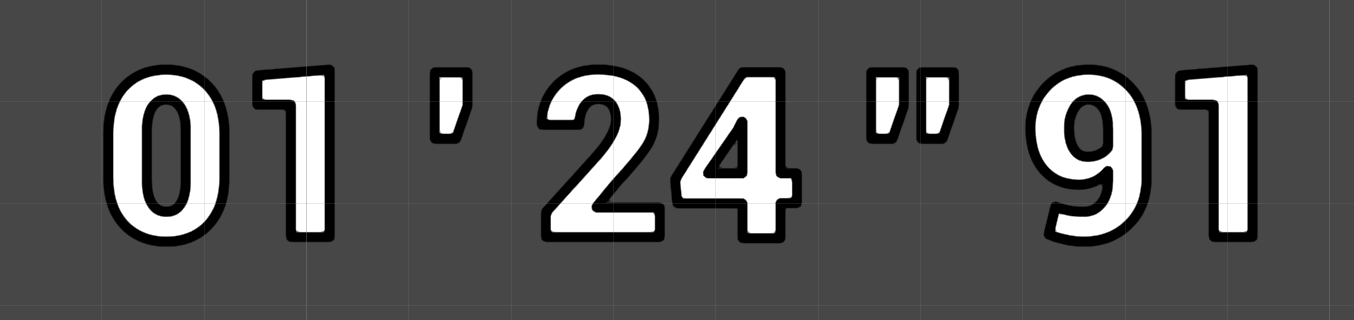
Téléchargez le fichier ExtDateTime.cs ci-dessous, puis utilisez les fonctions comme dans cet exemple :
float timeInSeconds = Chrono.GetTimer();    //return eg: 84,91

//convert 84,91 into a structure, once filled,
//it contains 1 minute, 24 seconds, and 91 milliseconds
ExtDateTime.TimeSec timeSec = ExtDateTime.GetTimeSec(timeInSeconds);

//convert the structure into a text 01 ' 24 '' 91. It also handles negative numbers.
string text = ExtDateTime.GetTimeInStringFromTimeSec(timeSec);
ExtDateTime.cs
/// <summary>
/// MIT License - Copyright(c) 2019 Ugo Belfiore
/// </summary>

using UnityEngine;

/// <summary>
/// Extensions for DateTime
/// </summary>
public static class ExtDateTime
{
    public struct TimeSec
    {
        public int Minutes;
        public int Seconds;
        public float Miliseconds;
        public bool IsNegative;

        public TimeSec(int minutes, int seconds, float miliseconds, bool isNegative)
        {
            Minutes = minutes;
            Seconds = seconds;
            Miliseconds = miliseconds;
            IsNegative = isNegative;
        }
    }

    /// <summary>
    /// from a TimeSec, transform it to a string
    /// </summary>
    /// <param name="timeSec"></param>
    /// <returns></returns>
    public static string GetTimeInStringFromTimeSec(TimeSec timeSec)
    {
        string timeInText = "";

        if (timeSec.IsNegative)
        {
            timeInText += '-';
        }

        if (timeSec.Seconds == -1)
        {
            return (timeInText);
        }

        if (timeSec.Minutes < 10)
        {
            timeInText += "0";
        }
        timeInText += timeSec.Minutes;

        timeInText += " ' ";

        if (timeSec.Seconds < 10)
        {
            timeInText += "0";
        }
        timeInText += timeSec.Seconds;

        timeInText += " '' ";

        timeSec.Miliseconds = (int)timeSec.Miliseconds;
        if (timeSec.Miliseconds < 10)
        {
            timeInText += "0";
        }

        if (timeSec.Miliseconds >= 100)
        {
            timeSec.Miliseconds = 99;
        }

        timeInText += timeSec.Miliseconds;
        return (timeInText);
    }

    /// <summary>
    /// Get a TimeSec from a float time in seconds
    /// </summary>
    /// <param name="time">time in seconds</param>
    /// <returns></returns>
    public static TimeSec GetTimeSec(float time)
    {
        float absTime = Mathf.Abs(time);

        int minutes = GetMinutes(absTime);
        int second = GetSeconds(absTime);
        float miliseconds = GetMiliseconds(absTime);
        return (new TimeSec(minutes, second, miliseconds, Mathf.Sign(time) == -1));
    }

    /// <summary>
    /// from a given time, Get the minutes
    /// </summary>
    public static int GetMinutes(float time)
    {
        int minutes = (int)(time / 60);
        return (minutes);
    }
    public static int GetSeconds(float time)
    {
        int seconds = (int)(time % 60);
        return (seconds);
    }
    public static float GetMiliseconds(float time)
    {
        int minutes = GetMinutes(time);
        int seconds = (int)(time % 60);
        return ((time - seconds - (minutes * 60)) * 100f);
    }
}
Fichiers source
Voir aussi
- Time, timeScale et deltaTime dans l’éditeur : une classe
TimeEditorqui reproduit le comportement de la classeTimeen mode édition. Utile pour les outils qui ont besoin de timers et de ralentis. - Composants EditorOnly et actions au moment du build : retirer du build les composants dont vous ne voulez pas tout en les gardant sur les GameObjects, et exécuter des actions au moment du build.