Time, timeScale and deltaTime in the editor
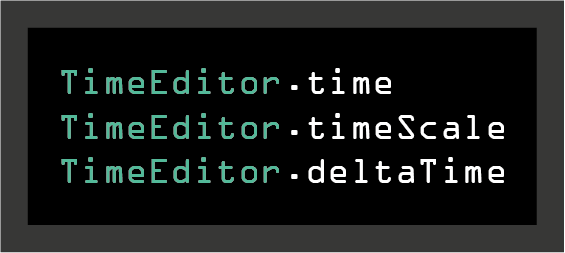
When you are building editor tools for your games, you sometimes need timers. Unfortunately, Unity doesn't provide any time management solution in edit mode.
I have created a TimeEditor class which mirrors the behavior of the Time class in edit mode. It gives us a deltaTime and a timeScale, just like in play mode. It works in the editor, in play mode, and of course in builds.
How to use
In your project, replace every occurrence of Time.time with TimeEditor.time, and that's it!
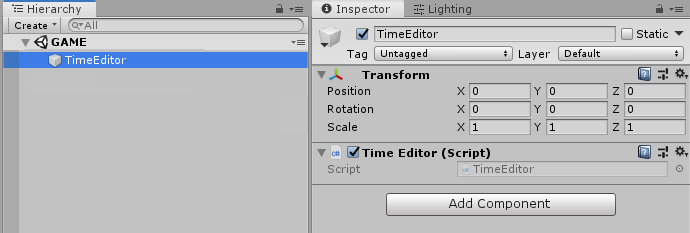
Simply put the script on an empty GameObject in the hierarchy of the scene where you use the TimeEditor.
Then, at any time in a script (an editor script or a regular one), call TimeEditor.time to get the timeScale-dependent time! That means you can also change the timeScale in the editor by doing TimeEditor.timeScale = 0.5f. Note that you can set the timeScale to anything you want, but in play mode a negative timeScale is not allowed.
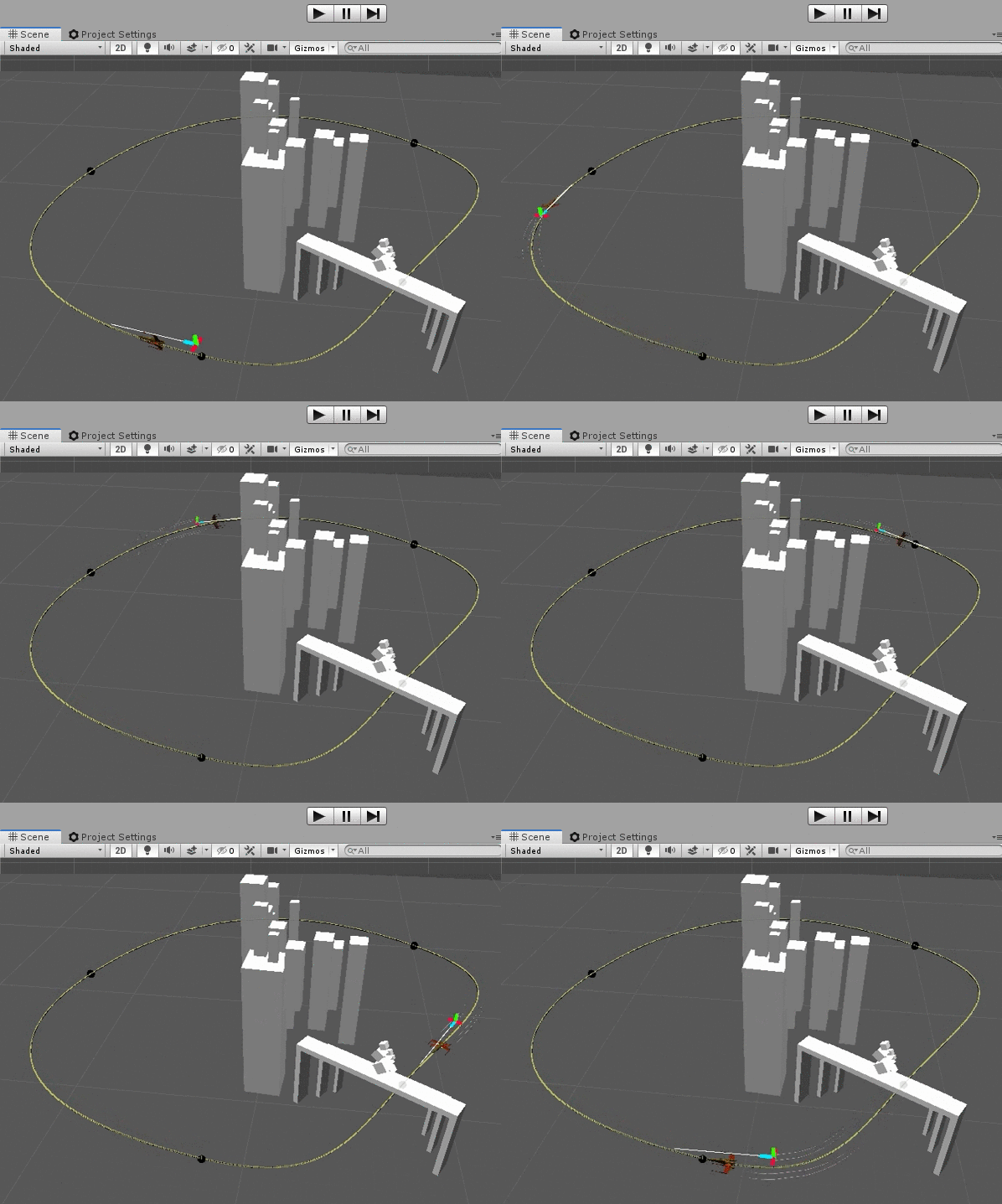
For example, when I move a player on each Update, I usually use something like this:
_player.Move(speed * Time.deltaTime);
Now, if I want my object to move in the editor as well, I just have to put [ExecuteInEditMode] just before my class, and use the TimeEditor class:
_player.Move(speed * TimeEditor.deltaTime);
Script execution order
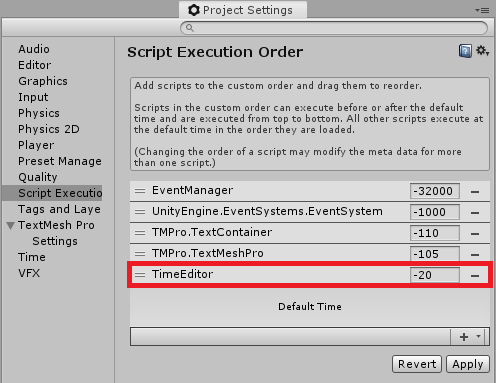
In the Script Execution Order, the TimeEditor class has to run before the Default Time.
Go to Edit > Project Settings and add it to the list in the Script Execution Order tab. Don't forget to press Apply.
The TimeEditor script uses the singleton pattern class SingletonMono<T>. You don't necessarily need it for this class to work, but it is convenient to have. If you don't use it, replace SingletonMono<TimeEditor> with MonoBehaviour; otherwise, also download the file SingletonMono.cs.
Scripts
TimeEditor.cs
/// <summary>
/// MIT License - Copyright(c) 2019 Ugo Belfiore
/// </summary>

#if UNITY_EDITOR
using System.Collections.Generic;
using UnityEditor;
#endif
using UnityEngine;

/// <summary>
/// Use this class instead of the Time class if you want to use time in editor
/// use TimeEditor.time instead of Time.time will work in editor & in play mode
///
/// use TimeEditor.time instead of Time.time
/// use TimeEditor.timeScale instead of Time.timeScale
/// use TimeEditor.unscaledTime instead of Time.unscaledTime
/// use TimeEditor.deltaTime instead of Time.deltaTime
/// use TimeEditor.unscaledDeltaTime instead of Time.unscaledDeltaTime
///
/// In editor, you can set the timeScale to negative to backward time !
/// but warning: doen't work in play mode
/// </summary>
[ExecuteInEditMode]
public class TimeEditor : SingletonMono<TimeEditor>
{
    private static float _editModeLastUpdate;   //the last time the controller was updated while in Edit Mode
    private static float _timeScale = 1f;       //current timeScale in both editor & play mode
    private static float _currentTime;          //current time timeScale-dependent (like Time.time but in editMode)
    private static float _currentTimeIndependentTimeScale;  //current time timeScale-independent (like Time.unscaledTime but in editMode)
    private static float _currentDeltaTime;     //current deltaTime timeScale-dependent (like Time.deltaTime but in editMode)
    private static float _currentUnscaledDeltaTime; //current deltaTime timeScale-independent (like Time.unscaledDeltaTime but in editMode)
    private static float _smoothDeltaTime;      //current deltatime, smoothed X time
    private static float _smoothUnscaledDeltaTime;      //current deltatime, smoothed X time

    private Queue<float> _olfDeltaTimes = new Queue<float>();         //list of all previousDeltaTime;
    private Queue<float> _olfUnscaledDeltaTimes = new Queue<float>();         //list of all previousDeltaTime;

    private readonly int _maxAmountDeltaTimeSaved = 10; //amount of previous deltaTime to save for the smoothDeltaTime algorythm

    //don't let the deltaTime get higher than 1/30: if you have low fps (bellow 30),
    //the game start to go in slow motion.
    //if you don't want this behavior, put the value at 0.4 for exemple as precaution, we don't
    //want the player, after a huge spike of 5 seconds, to travel walls !
    private readonly float _maxSizeDeltaTime = 0.033f;

    #region public properties

    /// <summary>
    /// get the current timeScale
    /// </summary>
    public static float timeScale
    {
        get
        {
            return (_timeScale);
        }
        set
        {
            if (value != _timeScale)
            {
                _timeScale = value;
                Time.timeScale = Mathf.Max(0, _timeScale);
            }
        }
    }
    /// <summary>
    /// the time (timeScale dependent) at the begening of this frame (Read only). This is the time in seconds since the start of the game / the editor compilation
    /// </summary>
    public static float time
    {
        get
        {
            return (_currentTime);
        }
    }

    /// <summary>
    /// The timeScale-independant time for this frame (Read Only). This is the time in seconds since the start of the game / the editor compilation
    /// </summary>
    public static float unscaledTime
    {
        get
        {
            return (_currentTimeIndependentTimeScale);
        }
    }

    /// <summary>
    /// The completion time in seconds since the last from (Read Only)
    /// </summary>
    public static float deltaTime
    {
        get
        {
            return (_currentDeltaTime);
        }
    }

    /// <summary>
    /// The timeScale-independent interval in seconds from the last frames to the curren tone
    /// </summary>
    public static float unscaledDeltaTime
    {
        get
        {
            return (_currentUnscaledDeltaTime);
        }
    }

    /// <summary>
    /// The timeScale-dependent smoothed DeltaTime, it's the average of the 'n = 10' previous frames
    /// </summary>
    public static float smoothDeltaTime
    {
        get
        {
            return (_smoothDeltaTime);
        }
    }

    /// <summary>
    /// The timeScale-independent smoothed DeltaTime, it's the average of the 'n = 10' previous frames
    /// </summary>
    public static float smoothUnscaledDeltaTime
    {
        get
        {
            return (_smoothUnscaledDeltaTime);
        }
    }
    #endregion

    #region private functions

    /// <summary>
    /// subscribe to EditorApplication.update to be able to call EditorApplication.QueuePlayerLoopUpdate();
    /// We need to do it because unity doens't update when no even are triggered in the scene.
    ///
    /// Then, Start the timer, this timer will increase every frame (in play or in editor mode), like the normal Time
    /// </summary>
    private void OnEnable()
    {
#if UNITY_EDITOR
        EditorApplication.update += EditorUpdate;
        //EditorApplication.playmodeStateChanged += HandleOnPlayModeChanged;
#endif
        _editModeLastUpdate = Time.realtimeSinceStartup;
        StartCoolDown();
    }

    protected void OnDisable()
    {
#if UNITY_EDITOR
        EditorApplication.update -= EditorUpdate;
        //EditorApplication.playmodeStateChanged -= HandleOnPlayModeChanged;
#endif
    }

    /// <summary>
    /// at start, we initialize the current time
    /// </summary>
    private void StartCoolDown()
    {
        _currentTime = 0;
        _currentTimeIndependentTimeScale = 0;
        _editModeLastUpdate = Time.realtimeSinceStartup;
    }

    /// <summary>
    /// called every frame, add delta time to the current timer, with or not timeScale
    /// </summary>
    private void AddToTime()
    {
        _currentDeltaTime = (Time.realtimeSinceStartup - _editModeLastUpdate) * timeScale;
        _currentDeltaTime = Mathf.Min(_currentDeltaTime, _maxSizeDeltaTime);    //if fps drop bellow 30fps, go into slow motion

        _currentUnscaledDeltaTime = (Time.realtimeSinceStartup - _editModeLastUpdate);
        _currentTime += _currentDeltaTime;
        _currentTimeIndependentTimeScale += _currentUnscaledDeltaTime;

        SetSmoothDeltaTimes();
    }

    /// <summary>
    /// Set and manage the smoothdeltaTime, by adding the average of the 'n' previous deltaTimes together
    /// </summary>
    private void SetSmoothDeltaTimes()
    {
        float sumOfPreviousDeltaTimes = _olfDeltaTimes.GetSum();
        float sumOfPreviousUnslacedDeltaTime = _olfUnscaledDeltaTimes.GetSum();

        _smoothDeltaTime = (_currentDeltaTime + (sumOfPreviousDeltaTimes)) / (_olfDeltaTimes.Count + 1);
        _smoothUnscaledDeltaTime = (_currentUnscaledDeltaTime + (sumOfPreviousUnslacedDeltaTime)) / (_olfUnscaledDeltaTimes.Count + 1);
        //_smoothDeltaTime = (_currentDeltaTime + (sum of 'n' previous delta times)) / ('n' + 1)

        _olfDeltaTimes.Enqueue(_currentDeltaTime);
        _olfUnscaledDeltaTimes.Enqueue(_currentUnscaledDeltaTime);

        while (_olfDeltaTimes.Count > _maxAmountDeltaTimeSaved)
        {
            _olfDeltaTimes.Dequeue();
        }

        while (_olfUnscaledDeltaTimes.Count > _maxAmountDeltaTimeSaved)
        {
            _olfUnscaledDeltaTimes.Dequeue();
        }
    }

    /// <summary>
    /// called every editurUpdate, tell unity to execute the Update() method even if no event are triggered in the scene
    /// in the scene.
    /// </summary>
#if UNITY_EDITOR
    private void EditorUpdate()
    {
        if (!Application.isPlaying)
        {
            EditorApplication.QueuePlayerLoopUpdate();
        }
    }
#endif

    /// <summary>
    /// called every frame in play and in editor, thanks to EditorApplication.QueuePlayerLoopUpdate();
    /// add to the current time, then save the current time for later.
    /// </summary>
    private void Update()
    {
        AddToTime();
        _editModeLastUpdate = Time.realtimeSinceStartup;
    }
    #endregion
}
SingletonMono.cs
/// <summary>
/// MIT License - Copyright(c) 2019 Ugo Belfiore
/// </summary>

using UnityEngine;

/// <summary>
/// Be aware this will not prevent a non singleton constructor
///   such as `T myT = new T();`
/// To prevent that, add `protected T () {}` to your singleton class.
///
/// As a note, this is made as MonoBehaviour because we need Coroutines.
///
/// </summary>
public class SingletonMono<T> : MonoBehaviour where T : MonoBehaviour
{
    private static T _instance;

    private static object _lock = new object();

    public static T Instance
    {
        get
        {
            if (applicationIsQuitting)
            {
                if (Application.isPlaying)
                {
                    Debug.Log("is quitting ?");
                    return null;
                }
                else
                {
                    applicationIsQuitting = false;
                }
            }

            lock (_lock)
            {
                if (_instance == null)
                {
                    _instance = (T)FindObjectOfType(typeof(T));

                    if (FindObjectsOfType(typeof(T)).Length > 1)
                    {
                        Debug.LogWarning("[Singleton] Something went really wrong " +
                            " - there should never be more than 1 singleton!" +
                            " Reopening the scene might fix it.");

                        return _instance;
                    }

                    if (_instance == null)
                    {

                    }
                    else
                    {

                    }
                }

                return _instance;
            }
        }
        set
        {
            _instance = value;
        }
    }

    private static bool applicationIsQuitting = false;
    /// <summary>
    /// When Unity quits, it destroys objects in a random order.
    /// In principle, a Singleton is only destroyed when application quits.
    /// If any script calls Instance after it have been destroyed,
    ///   it will create a buggy ghost object that will stay on the Editor scene
    ///   even after stopping playing the Application. Really bad!
    /// So, this was made to be sure we're not creating that buggy ghost object.
    /// </summary>

    private void OnApplicationQuit()
    {
        applicationIsQuitting = true;
    }
}
How it works
First, [ExecuteInEditMode] allows the Update method of a MonoBehaviour to be called even in edit mode.
Then, we need to tell Unity to update even if no event is fired in the scene. Without it, Unity doesn't update every frame as we might instinctively assume. To accomplish this, we need to call EditorApplication.QueuePlayerLoopUpdate(); in the EditorApplication.update loop.
To achieve this, we subscribe our custom function EditorUpdate() to Unity's internal editor loop: EditorApplication.update += EditorUpdate;
Then we need our own deltaTime if we want a timeScale in the editor. So every frame we save the deltaTime (the time difference in seconds between the last frame and the current one), and multiply it by the timeScale:
private void AddToTime()
{
    _currentDeltaTime = (Time.realtimeSinceStartup - _editModeLastUpdate) * timeScale;
    _currentDeltaTime = Mathf.Min(_currentDeltaTime, _maxSizeDeltaTime);    //if fps drop below 30fps, go into slow motion

    _currentUnscaledDeltaTime = (Time.realtimeSinceStartup - _editModeLastUpdate);
    _currentTime += _currentDeltaTime;
    _currentTimeIndependentTimeScale += _currentUnscaledDeltaTime;

    SetSmoothDeltaTimes();
}
After that, you have a TimeEditor class with the same behavior as Unity's Time. You can create custom timers in your editor tools, and even do slow motion by changing the timeScale. To try it out, have a look at my chrono and cooldown classes, which use this TimeEditor class.
I have added a smoothDeltaTime algorithm which takes the 10 previously saved deltaTimes (variable _maxAmountDeltaTimeSaved) and returns their mean. I highly recommend using it if you want to apply damping on a fast camera following a fast target with an inconsistent framerate.
The deltaTime is deliberately capped to _maxSizeDeltaTime, set to 0.033f (1/30). In other words, if your game drops below 30 fps, it will start going into slow motion. If you don't want that to happen, change the variable to a higher value, like 0.4 seconds for example.
This safeguard avoids a huge deltaTime when there is a big spike in your framerate. It therefore prevents the player, or any other object moved based on deltaTime, from teleporting after a spike.
Source files
See also
- Chrono and cooldown timers: For all your timers and cooldowns in Unity. No more
Invoke(), coroutines or testing the time the hard way insideUpdate(). - EditorOnly components and actions when building: Remove components you don't want in the build while keeping them on GameObjects, and execute actions when building your application.