Rotation and Matrix TRS
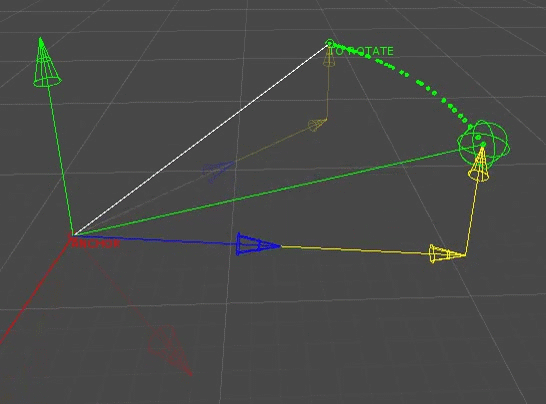
Rotating a point around another in 3D space is not so easy if we want to handle any axis without gimbal lock.
The goal of this function is to use pure math, without any Transform whatsoever. Not just for the beauty of it, but mainly because sometimes we want to calculate this kind of thing without having to use, or generate, empty GameObjects. I will use matrices, quaternions and some basic math. Here are the given parameters:
Vector3 pivotPoint(pivot reference for the rotation)Vector3 pointToRotate(point to rotate along the given up axis)Vector3 upNormalized(up axis)Vector3 rotationAxis(X, Y, Z rotation to apply)
Common way of rotating things in global space
If you are using a Transform, a simple transform.Rotate(X, Y, Z) is often enough to rotate it, locally or globally. Internally, for a given Euler angle (X, Y, Z), Unity uses this kind of calculation to rotate a Transform in global space:
Quaternion rotationToApply = Quaternion.Euler(X, Y, Z);
currentRotation = currentRotation * (Quaternion.Inverse(currentRotation) * rotationToApply * currentRotation);
currentRotation is the rotation of the TRS matrix of the Transform.
When you want to rotate a point around a pivot in global space (in a world with Vector3.up as the real up), the functions below are enough:
public static Vector3 RotatePointAroundPivot(Vector3 pivot, Vector3 point, Vector3 angles)
{
   return RotatePointAroundPivot(point, pivot, Quaternion.Euler(angles));
}

public static Vector3 RotatePointAroundPivot(Vector3 pivot, Vector3 point, Quaternion rotation)
{
   return rotation * (point - pivot) + pivot;
}
As I said, this method works ONLY in a world with these references:
- up:
Vector3.up (0, 1, 0) - forward:
Vector3.forward (0, 0, 1) - right:
Vector3.right (1, 0, 0)
But what if I want to rotate from another rotation reference?
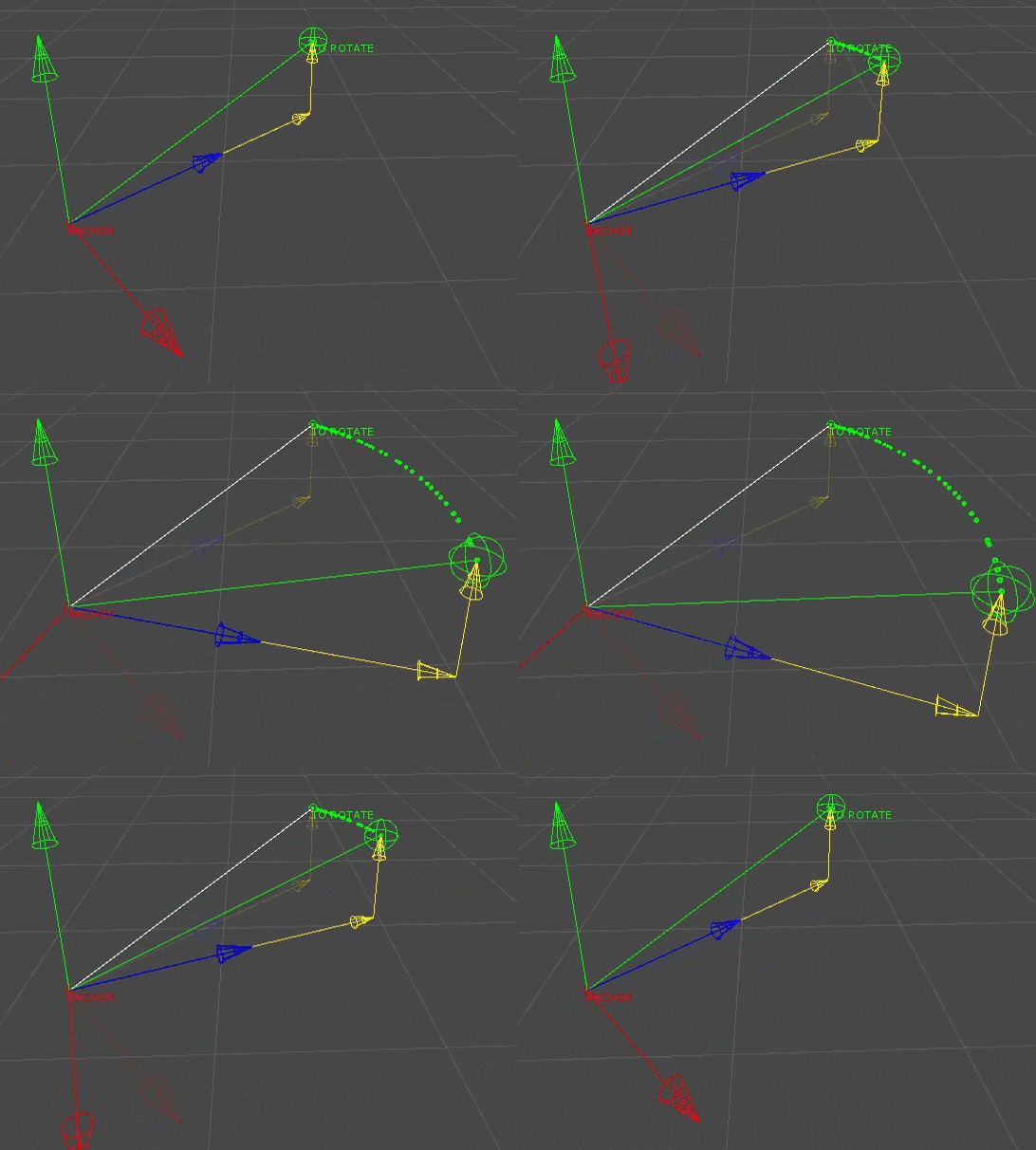
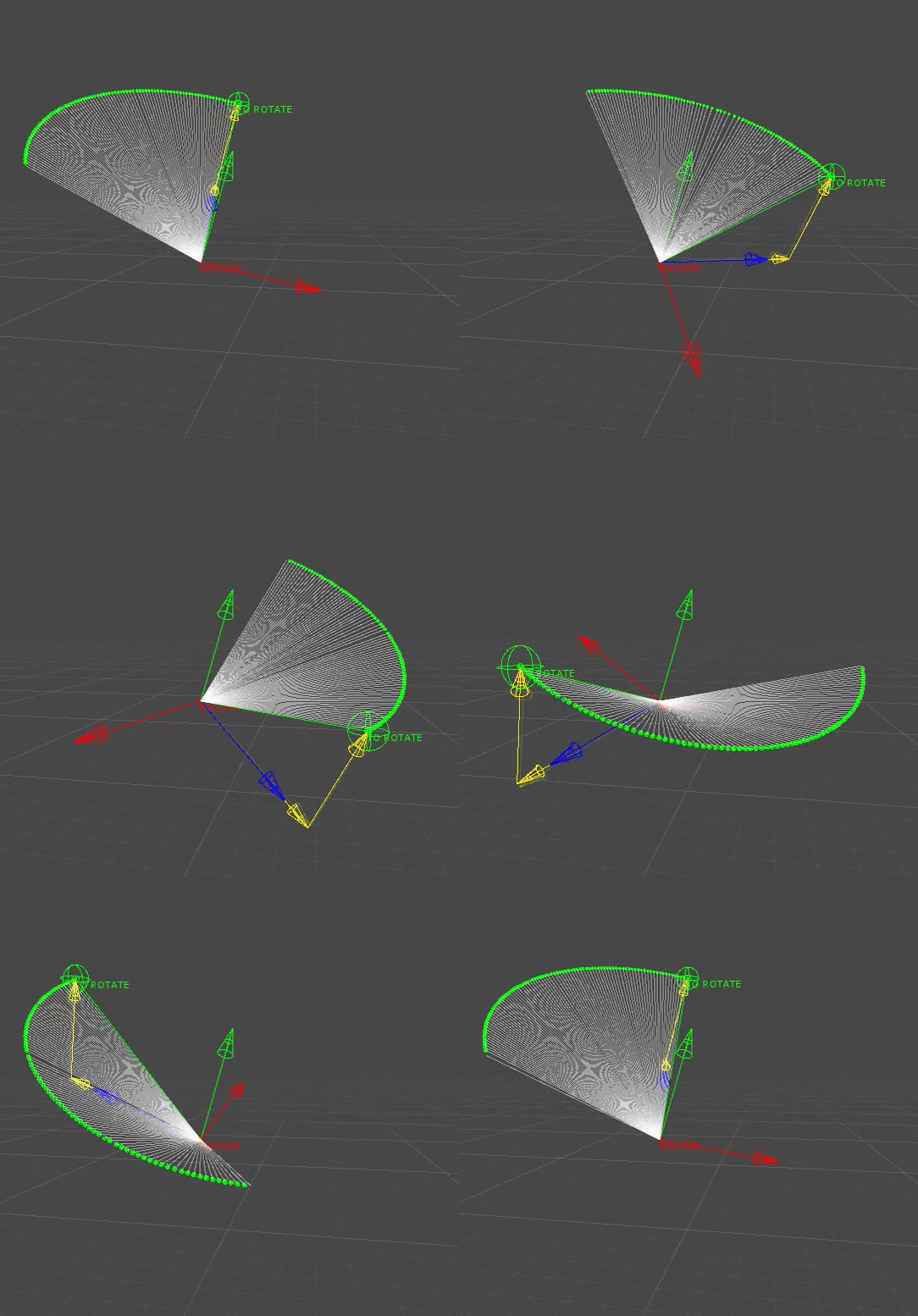
Well, use our own matrix to rotate properly from a local space:
Full functions
Functions RotatePointAroundAxis() and RotateVectorAroundAxis()
/// <summary>
/// Rotate a Point around an axis
/// usage:
/// Vector3 position = ExtRotation.RotatePointAroundAxis(pivotPosition, pointToRotate, pivotUp, _rotateAxis * TimeEditor.deltaTime);
/// </summary>
public static Vector3 RotatePointAroundAxis(Vector3 pivotPoint, Vector3 pointToRotate, Vector3 upNormalized, Vector3 rotationAxis)
{
    Vector3 vectorDirector = pointToRotate - pivotPoint;
    Vector3 finalPoint = RotateWithMatrix(pivotPoint, vectorDirector, upNormalized, rotationAxis);
    return (finalPoint);
}

/// <summary>
/// Rotate a vectorDirector around an axis
/// usage:
/// Vector3 vectorDirector = ExtRotation.RotateVectorAroundAxis(pivotPoint, vectorDirector, pivotUp, _rotateAxis * TimeEditor.deltaTime);
/// </summary>
public static Vector3 RotateVectorAroundAxis(Vector3 pivotPoint, Vector3 vectorDirector, Vector3 upNormalized, Vector3 rotationAxis)
{
    Vector3 finalPoint = RotateWithMatrix(pivotPoint, vectorDirector, upNormalized, rotationAxis);
    return (finalPoint - pivotPoint);
}

private static Vector3 RotateWithMatrix(Vector3 pivotPoint, Vector3 vectorDirector, Vector3 upNormalized, Vector3 rotationAxis)
{
    Quaternion constrainRotation = TurretLookRotation(vectorDirector, upNormalized);            //constrain rotation from up !!

    //create a TRS matrix from point & rotation
    Matrix4x4 rotationMatrix = Matrix4x4.TRS(pivotPoint, constrainRotation, Vector3.one);

    Vector3 projectedForward = ExtVector3.ProjectAOnB(vectorDirector, rotationMatrix.ForwardFast());
    Vector3 projectedUp = ExtVector3.ProjectAOnB(vectorDirector, upNormalized);
    float distanceForward = projectedForward.magnitude;
    float distanceUp = projectedUp.magnitude;

    if (ExtVector3.DotProduct(upNormalized, vectorDirector) < 0)
    {
        distanceUp *= -1;
    }

    //rotate matrix in x, y & z
    rotationMatrix = Matrix4x4.TRS(pivotPoint, constrainRotation * Quaternion.Euler(rotationAxis), Vector3.one);
    Vector3 finalPoint = rotationMatrix.MultiplyPoint3x4(new Vector3(0, distanceUp, distanceForward));
    return finalPoint;
}

public static Quaternion TurretLookRotation(Vector3 approximateForward, Vector3 exactUp)
{
    Quaternion rotateZToUp = Quaternion.LookRotation(exactUp, -approximateForward);
    Quaternion rotateYToZ = Quaternion.Euler(90f, 0f, 0f);

    return rotateZToUp * rotateYToZ;
}

public static Vector3 ProjectAOnB(Vector3 A, Vector3 B)
{
    float sqrMag = DotProduct(B, B);
    if (sqrMag < Mathf.Epsilon)
    {
        return (Vector3.zero);
    }
    else
    {
        var dot = DotProduct(A, B);
        return new Vector3(B.x * dot / sqrMag,
            B.y * dot / sqrMag,
            B.z * dot / sqrMag);
    }
}

public static float DotProduct(Vector3 a, Vector3 b)
{
    return (a.x * b.x + a.y * b.y + a.z * b.z);
}
How does it work?
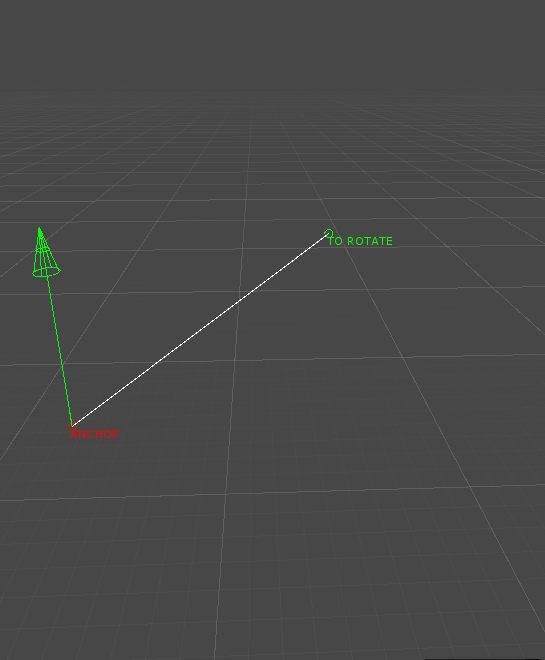
First, let's recap what we need
Vector3 pivotPoint(pivot reference for the rotation)Vector3 pointToRotate(point to rotate along the given up axis)Vector3 upNormalized(up axis)Vector3 rotationAxis(X, Y, Z rotation to apply)
From there we can visualize the up vector, and calculate the vector director: Vector3 vectorDirector = pointToRotate - pivotPoint;
Create a TRS matrix
A TRS matrix is the representation of a position, rotation and scale in the world. We have the position Vector3 pivotPoint, the scale is Vector3.one, but we are missing the rotation. We need to turn our vectorDirector into a quaternion.
This quaternion needs to be aligned with the up vector. It is represented by the blue arrow in the picture below. The following function does just that: Quaternion constrainRotation = TurretLookRotation(vectorDirector, upNormalized);
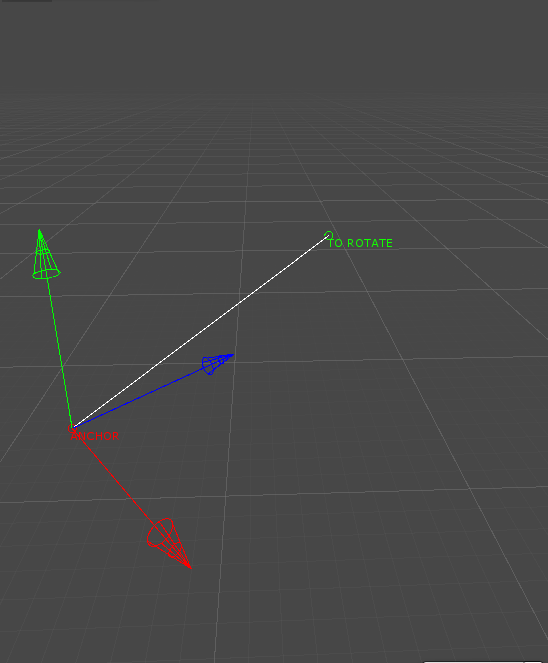
Now let's create our matrix: Matrix4x4.TRS(pivotPoint, constrainRotation, Vector3.one);
To get the forward, right and up vectors of a matrix, I have created convenient extensions:
Matrix4x4.UpFast()
Matrix4x4.ForwardFast()
Matrix4x4.RightFast()
They simply apply a Matrix4x4.GetColumn(i) to get the appropriate axis.
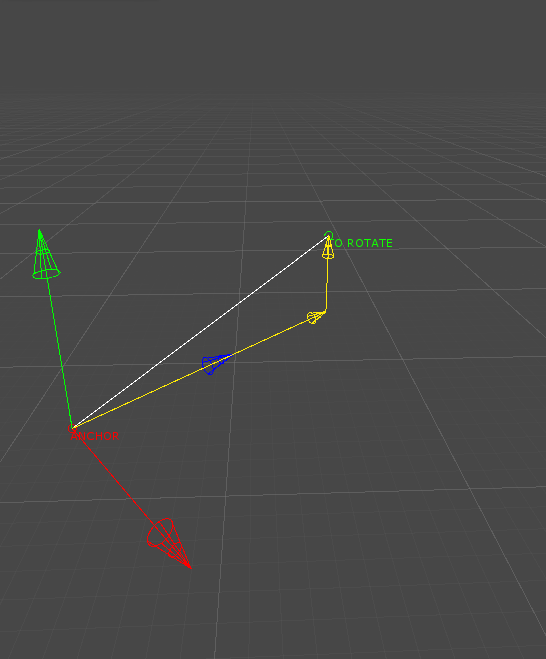
Now get these yellow vectors for later
A vector projection is done with this function: Vector3 projectedVector = ProjectAOnB(Vector3 A, Vector3 B)
We need the forward and up magnitudes. Therefore we calculate the two vectors, taking care of the potential negative value for up:
Vector3 projectedForward = ProjectAOnB(vectorDirector, rotationMatrix.ForwardFast());
Vector3 projectedUp = ProjectAOnB(vectorDirector, upNormalized);
float distanceForward = projectedForward.magnitude;
float distanceUp = projectedUp.magnitude;

if (DotProduct(upNormalized, vectorDirector) < 0)
{
    distanceUp *= -1;
}
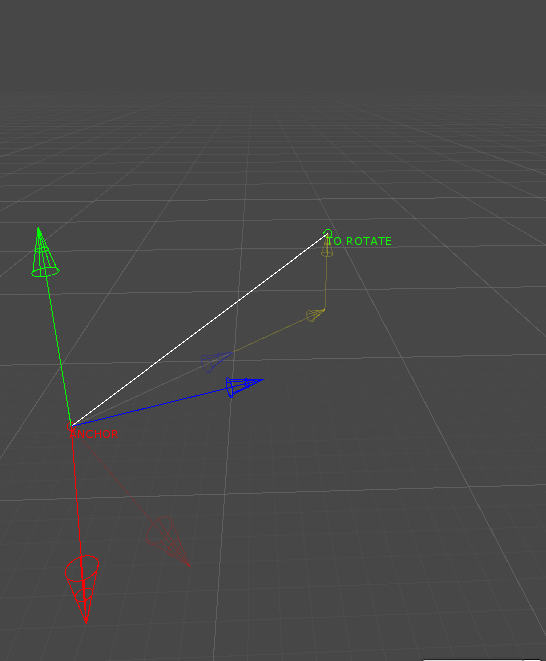
Apply the rotation to the matrix
Two more steps to go. We can finally rotate the matrix. For simplicity, I have decided to create another matrix, with a new rotation offset:
rotationMatrix = Matrix4x4.TRS(pivotPoint, constrainRotation * Quaternion.Euler(rotationAxis), Vector3.one);
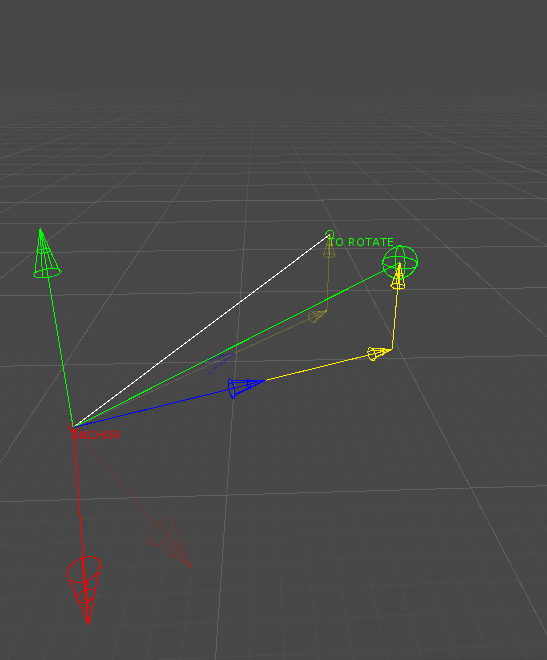
Get the final point
And after all this work, we can use the function MultiplyPoint3x4, which transforms our previous local up and forward distances into a global final point:
Vector3 finalPoint = rotationMatrix.MultiplyPoint3x4(new Vector3(0, distanceUp, distanceForward));