Change the mouse position by code in the editor
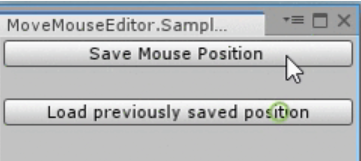
In some tools, it is often useful to relocate the mouse to a given place. This quick article shows how to move the Windows mouse cursor from the editor (editor only, and Windows only).
You can:
- Save the mouse position
- Move the mouse to a given x ; y position
- Move the mouse back to the previously saved position
Demonstration
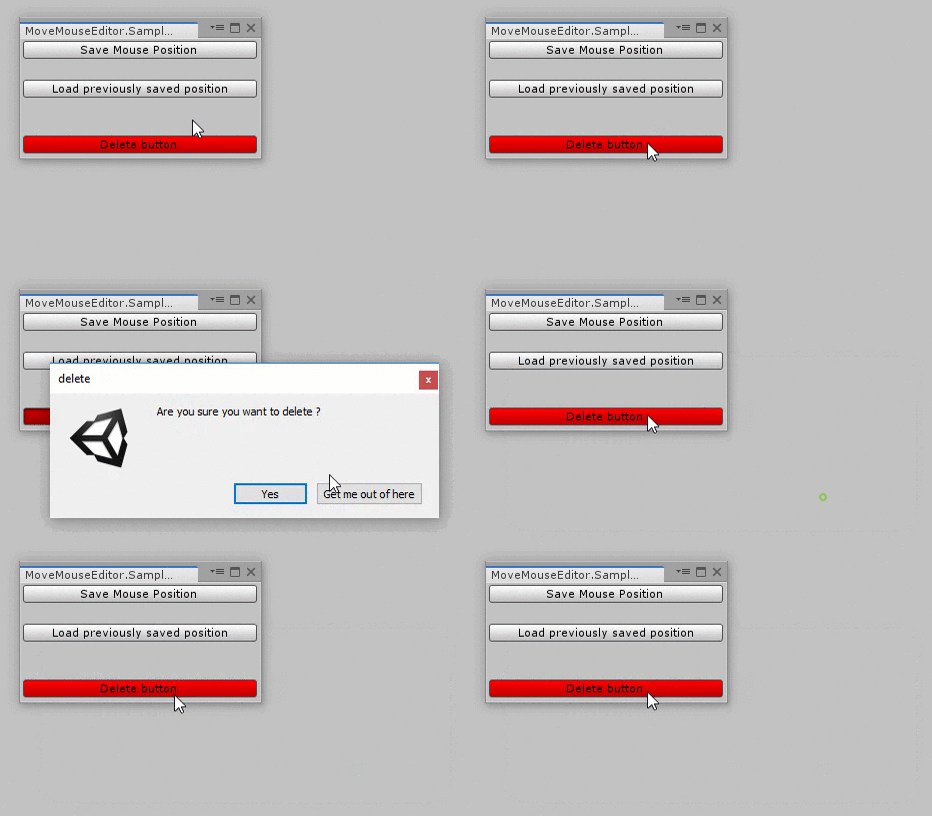
Here is a use case: when you click on the "Delete" button, we save the current mouse position and display a popup. When the popup is closed, we move the mouse back to the previously saved position.
How to use

- It only works on Windows. If you are on Mac or Linux, I am sure you can find the alternative online.
- Put the scripts below inside any
Editor/folder. - I use an
EditorWindowto show the example: open it from Window/SampleEditorWindow, as shown in the image. You can change that menu path in the scriptSampleEditorWindow.cs, just before theInit()function.
Scripts
Win32Mouse.cs
Win32Mouse.cs
/// <summary>
/// MIT License - Copyright(c) 2019 Ugo Belfiore
/// </summary>

#if UNITY_STANDALONE_WIN || UNITY_EDITOR
using System.Runtime.InteropServices;
using UnityEngine;

namespace MoveMouseEditor
{
    public static class Win32Mouse
    {
        [DllImport("User32.Dll")]
        private static extern long SetCursorPos(int x, int y);

        [DllImport("user32.dll")]
        [return: MarshalAs(UnmanagedType.Bool)]
        private static extern bool GetCursorPos(out POINT lpPoint);

        private static Vector2 _lastPosition;

        [StructLayout(LayoutKind.Sequential)]
        public struct POINT
        {
            public int X;
            public int Y;

            public POINT(int x, int y)
            {
                this.X = x;
                this.Y = y;
            }
        }

        /// <summary>
        /// change the mouse position in window
        /// </summary>
        /// <param name="positon">wanted position</param>
        public static void SetCursorPosition(Vector2 positon)
        {
            SetCursorPosition((int)positon.x, (int)positon.y);
        }
        /// <summary>
        /// change the mouse position in window
        /// </summary>
        /// <param name="x">wanted position x</param>
        /// <param name="y">wanted position y</param>
        public static void SetCursorPosition(int x, int y)
        {
            Win32Mouse.SetCursorPos(x, y);
        }

        /// <summary>
        /// change the mouse position with the previously saved position.
        /// If you did'nt saved the mouse position, set the mouse cursor
        /// to 0,0
        /// </summary>
        public static void LoadPreviouslySavedPosition()
        {
            Win32Mouse.SetCursorPosition(Win32Mouse.GetLastSavedPosition());
        }

        /// <summary>
        /// save the mouse position
        /// </summary>
        public static void SavePosition()
        {
            _lastPosition = GetCursorPosition();
        }

        /// <summary>
        /// return the last saved position
        /// </summary>
        /// <returns></returns>
        public static Vector2 GetLastSavedPosition()
        {
            return (_lastPosition);
        }

        /// <summary>
        /// add an offset to the current mouse position
        /// </summary>
        /// <param name="offset">offset to apply</param>
        public static void AddToMousePosition(Vector2 offset)
        {
            Vector2 currentPosition = Win32Mouse.GetCursorPosition();
            Win32Mouse.SetCursorPosition(currentPosition + offset);
        }

        /// <summary>
        /// return the current mouse position X,Y
        /// </summary>
        /// <returns>mouse position</returns>
        public static Vector2 GetCursorPosition()
        {
            POINT newPoint;
            Win32Mouse.GetCursorPos(out newPoint);
            return (new Vector2(newPoint.X, newPoint.Y));
        }
    }
}
#endif
SampleEditorWindow.cs
SampleEditorWindow.cs
/// <summary>
/// MIT License - Copyright(c) 2019 Ugo Belfiore
/// </summary>

using UnityEditor;
using UnityEngine;

namespace MoveMouseEditor
{
    /// <summary>
    /// exemple of an EditorWindow
    /// </summary>
    public class SampleEditorWindow : EditorWindow
    {
        [MenuItem("Window/SampleEditorWindow")]
        static void Init()
        {
            SampleEditorWindow window = (SampleEditorWindow)EditorWindow.GetWindow(typeof(SampleEditorWindow));
            window.Show();
        }

        /// <summary>
        /// display all the GUI inside the editorWindow
        /// </summary>
        private void OnGUI()
        {
            DisplayButtons();
        }

        /// <summary>
        /// display the core of the editorWindow
        /// </summary>
        private void DisplayButtons()
        {
            DisplaySaveButton();
            GUILayout.Label("");
            DisplayLoadButton();
            GUILayout.Label("");
            GUILayout.Label("");
            DisplayDeleteButton();
        }

        /// <summary>
        /// display save button & execute the saving position if button pressed
        /// </summary>
        private void DisplaySaveButton()
        {
            if (GUILayout.Button("Save Mouse Position"))
            {
                Win32Mouse.SavePosition();
                Debug.Log("mouse position saved !");
            }
        }

        /// <summary>
        /// display load button & execute the loading position if button pressed
        /// </summary>
        private void DisplayLoadButton()
        {
            if (GUILayout.Button("Load previously saved position"))
            {
                Win32Mouse.LoadPreviouslySavedPosition();
                Debug.Log("mouse moved to the previously saved position !");
            }
        }

        /// <summary>
        /// display delete button & open the popup if button pressed
        /// </summary>
        private void DisplayDeleteButton()
        {
            GUI.backgroundColor = Color.red;
            if (GUILayout.Button("Delete button"))
            {
                if (!ExtGUI.DrawDisplayDialog(mainTitle: "delete", content: "Are you sure you want to delete ?"))
                {
                    return;
                }
                Debug.Log("content deleted !");
            }
            GUI.backgroundColor = Color.white;
        }
    }
}
ExtGUI.cs
ExtGUI.cs
/// <summary>
/// MIT License - Copyright(c) 2019 Ugo Belfiore
/// </summary>

using UnityEditor;

namespace MoveMouseEditor
{
    /// <summary>
    /// Display a Dialog Box. Return true if the user press YES
    /// return false if the user press CANCEL, or press exit
    ///
    /// if replaceMousePositionAtTheEnd is true, move the mouse position
    /// to it's original emplacement before the dialog show up.
    /// </summary>
    public static class ExtGUI
    {
        public static bool DrawDisplayDialog(
            string mainTitle = "main title",
            string content = "what's the dialog box say",
            string accept = "Yes",
            string no = "Get me out of here",
            bool replaceMousePositionAtTheEnd = true)
        {
            if (replaceMousePositionAtTheEnd)
            {
                Win32Mouse.SavePosition();
            }
            if (!EditorUtility.DisplayDialog(mainTitle, content, accept, no))
            {
                if (replaceMousePositionAtTheEnd)
                {
                    Win32Mouse.SetCursorPosition(Win32Mouse.GetLastSavedPosition());
                }
                return (false);
            }
            if (replaceMousePositionAtTheEnd)
            {
                Win32Mouse.SetCursorPosition(Win32Mouse.GetLastSavedPosition());
            }
            return (true);
        }
    }
}
Source files
See also
- Switch camera projection: swap the camera projection from perspective to orthographic using linear interpolation coupled with an easing function.
- Chrono and cooldown: for all your timers and cooldowns in Unity. No more
Invoke(), coroutines or manual time checks insideUpdate(). - Time, TimeScale and DeltaTime in the editor: a
TimeEditorclass which mirrors the behavior of theTimeclass in edit mode. Useful for tools that need timers and slow motion.