Chrono and cooldown timers
Every time you need a timer, you should use a custom timer like this one. Invoke() methods and coroutines are not the best way to go if you just need a simple timer:
- First, they use processing and memory for nothing.
- Second, they add confusion to the code.
- Third, you don't have the ability to pause, loop...
The solution is a simple chrono script which can be started, paused and looped. I have created two classes for two slightly different needs:
FrequencyChrono: it starts the time at 0 and goes forward (or backward, if your timeScale is negative!)FrequencyCoolDown: it starts at X seconds, and goes toward 0
In both scripts I use the class TimeEditor to have the timers working in both edit and play mode (more info here). Furthermore, using the TimeEditor allows you to have a negative timeScale. In short: go back in time!
If you don't want to use it, simply replace TimeEditor with Time.
What it does
FrequencyChrono
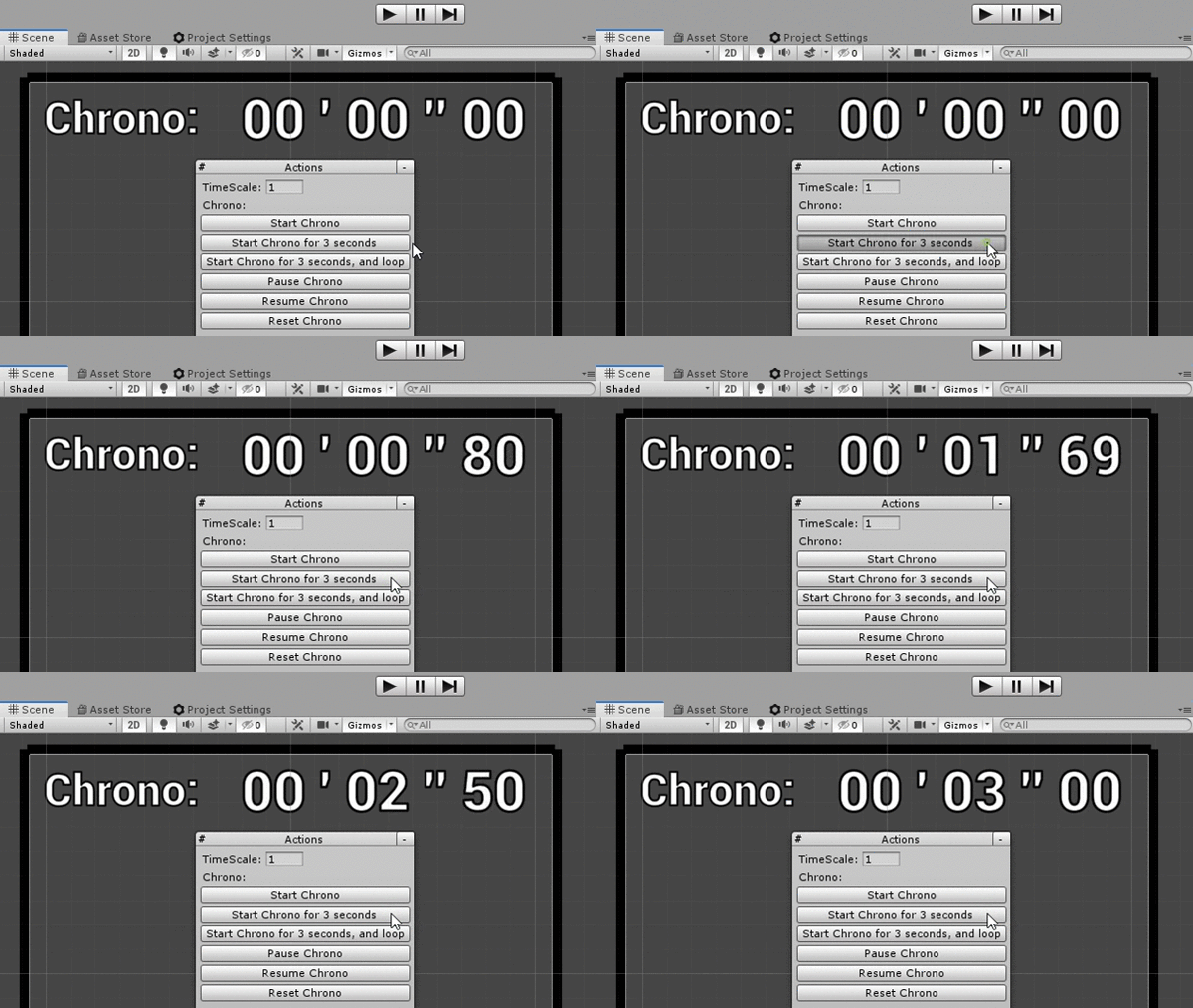
A chrono which starts the time at 0 and goes forward.
- It handles the
timeScale, in the editor and in play mode - It can be paused and resumed
- It can loop from a given
MaxTime, or stop if needed - It can be manually moved forward or backward if needed
- It can go backward if the timeScale is negative
FrequencyCoolDown
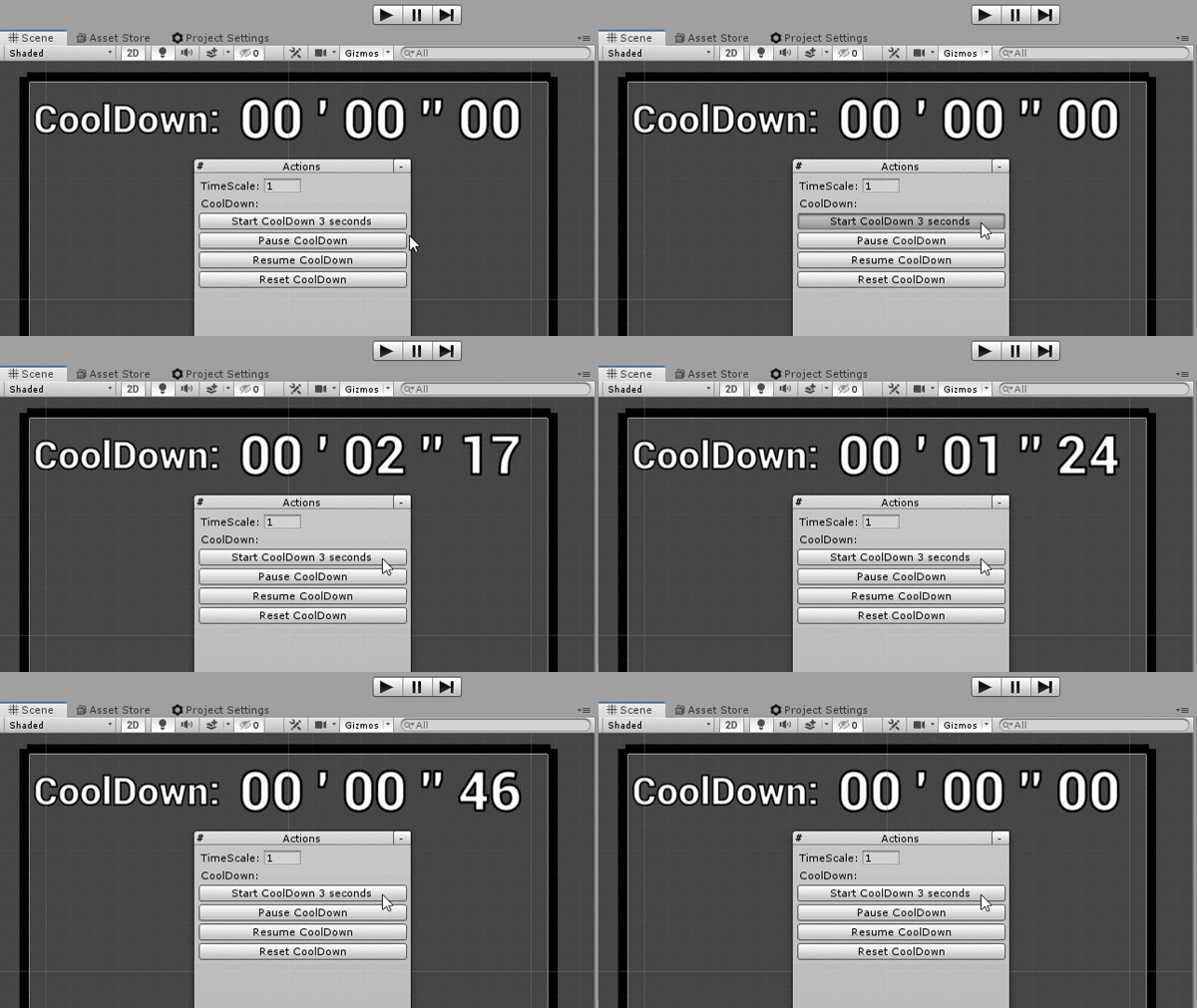
A cooldown which starts at X seconds, and goes toward 0.
- It handles the
timeScale, in the editor and in play mode - It can be paused and resumed
How to use
Here are examples for both classes; use whichever is more convenient for you. First, you need to instantiate the timer:
private FrequencyCoolDown _coolDown = new FrequencyCoolDown();
private FrequencyChrono _chrono = new FrequencyChrono();
At any time, in an editor script or in a regular script, you can start the timers:
_coolDown.StartCoolDown(5f);    //it will go from 5 to 0

_chrono.StartChrono();          //it will go from 0 to infinite
_chrono.StartChrono(5f);        //it will go from 0 to 5, and stay at 5
_chrono.StartChrono(5f, true);  //it will loop from 0 to 5
At any time, you can get the current time:
_coolDown.GetTimer();
_chrono.GetTimer();
To test whether the timers are currently running:
if (_coolDown.IsRunning()) {}
if (_chrono.IsRunning()) {}
To test whether the timers have started and finished:
if (_coolDown.IsFinished()) {}
if (_chrono.IsFinished()) {}
Scripts
FrequencyChrono.cs
/// <summary>
/// MIT License - Copyright(c) 2019 Ugo Belfiore
/// </summary>

using UnityEngine;

/// <summary>
/// Create a Chrono, who start at 0, and increment over time.
///
/// Use: create a new FrequencyChrono:
/// private FrequencyChrono _chrono = new FrequencyChrono();
///
/// Start it when you want:
/// _coolDown.StartChono();
///
/// You can give it a max time (it will go from 0 to 5, and stay at 5)
/// _coolDown.StartChrono(5f);
///
/// You can even ask it to loop:
/// _coolDown.StartChrono(5f, true);
///
/// at any time you want, get the current value of the Chrono:
/// _coolDown.GetTimer();
///
/// if you want to test if the Chrono is currently running
/// if (_coolDown.IsRunning())
///
/// if you have set a maxTime, and you want to test if the _coolDown is Started, and Finished:
/// if (_coolDown.IsFinished())
///
/// Sometime it nice to know if the timer is not initialize, or finished, to start it again, you can do it with this:
/// if (_coolDown.IsNotStartedOrFinished())
/// </summary>
[System.Serializable]
public class FrequencyChrono
{
    private float _timeStart = 0;
    private bool _loop = false;
    private float _maxTime = -1;
    public float MaxTime { get { return (_maxTime); } set { _maxTime = value; } }
    private float _saveTime = 0;
    private bool _isInPause = false;
    public bool IsInPause {  get {  return (_isInPause); } }
    private bool _isFinishedOrNeverStarted = true;
    private bool _isStarted = false;
    public bool IsStarted { get { return (_isStarted); } }
    private bool _useUnscaleTime = false;

    private float _currentTime;

    #region public functions

    /// <summary>
    /// Start the Chrono
    /// </summary>
    /// <param name="useUnscaleTime">define if we want to use a timeScale-independent timer or not</param>
    public void StartChrono(bool useUnscaleTime = false)
    {
        _useUnscaleTime = useUnscaleTime;
        _timeStart = GetTimeScaledOrNot();
        _loop = false;
        _isInPause = false;
        _maxTime = -1;
        _isFinishedOrNeverStarted = true;
        _isStarted = true;
    }

    /// <summary>
    /// Start the Chrono, with a maxTime. The chrono will stop at the max time,
    /// or loop  if needed.
    /// </summary>
    /// <param name="maxTime">max time in seconds</param>
    /// <param name="loop">do the chrono loop modulo maxTime ?</param>
    /// <param name="useUnscaleTime">define if we want to use a timeScale-independent timer or not</param>
    public void StartChrono(float maxTime, bool loop, bool useUnscaleTime = false)
    {
        //if there is a negative maxTime, don't use it, and simply advance forward the timer without stopping
        if (maxTime < 0)
        {
            StartChrono(useUnscaleTime);
            return;
        }

        _useUnscaleTime = useUnscaleTime;
        _timeStart = GetTimeScaledOrNot();
        _loop = loop;
        _maxTime = maxTime;
        _isInPause = false;
        _isFinishedOrNeverStarted = true;
        _isStarted = true;
    }

    /// <summary>
    /// return the current timer, in seconds
    /// eg: return 125.95 if the timer is at 2 minutes, 5 seconds and 95 miliseconds
    /// </summary>
    /// <param name="managePause">Should always be true, return the time when we were in pause</param>
    /// <returns>return the time in seconds eg: return 125.95 if the timer is at 2 minutes, 5 seconds and 95 miliseconds</returns>
    public float GetTimer(bool managePause = true)
    {
        if (!_isStarted)
        {
            return (0);
        }

        if (managePause && _isInPause)
        {
            return (_saveTime);
        }

        _currentTime = GetTimeScaledOrNot() - _timeStart;

        if (_loop)
        {
            if (_currentTime > _maxTime)
            {
                _currentTime -= _maxTime;
            }
            _currentTime %= _maxTime;
        }
        else if (_maxTime != -1 && Mathf.Abs(_currentTime) > _maxTime)
        {
            _currentTime = _maxTime * Mathf.Sign(_currentTime);
        }

        return (_currentTime);
    }

    /// <summary>
    /// Is the Chrono started, but not finished yet ?
    /// if the Start options loop is set to false, and if the chrono is started,
    ///     it will return true as long as you don't reset it.
    /// </summary>
    public bool IsRunning()
    {
        if (IsStarted && _isInPause)
        {
            return (true);
        }

        if (IsStarted && (!IsTimeExceedMaxTime() || _loop))
        {
            return (true);
        }
        return (false);
    }

    /// <summary>
    /// Is the Chrono not started, or started and over ?
    /// </summary>
    /// <returns></returns>
    public bool IsNotRunning()
    {
        return (!IsRunning());
    }

    /// <summary>
    /// is the timer not started, or started and over, and not in pause
    /// </summary>
    /// <returns>return true if the chrono is not started, or started and over</returns>
    public bool IsNotStartedOrFinished()
    {
        if (!IsStarted)
        {
            return (true);
        }
        if (_isInPause)
        {
            return (false);
        }

        //if _maxTime is at 1, that mean we do'nt have any stop time, we will continue forever.
        if (_maxTime == -1)
        {
            return (false);
        }

        _currentTime = GetTimeScaledOrNot() - _timeStart;
        return (Mathf.Abs(_currentTime) >= _maxTime);
    }

    /// <summary>
    /// return true if the timer is finished (and reset the timer)
    ///
    /// if the parametter resetIfFinished si set to true, the chrono will
    /// reset if the coolDown is finished. That's mean if we test IsFinished() again, it will return false
    ///
    /// if the timer never started, return false;
    /// if the timer is in looping mode, return false;
    /// </summary>
    /// <param name="resetIfFinished">if true, the coolDown is reset. That's mean if we test IsFinished() again, it will return false</param>
    /// <returns></returns>
    public bool IsFinished(bool resetIfFinished = true)
    {
        if (_loop)
        {
            return (false);
        }

        if (!IsStarted)
        {
            return (false);
        }

        if (_maxTime == -1)
        {
            return (false);
        }

        if (IsTimeExceedMaxTime())
        {
            if (resetIfFinished)
            {
                Reset();
            }
            return (true);
        }
        //Debug.Log("ic not finished...");
        return (false);
    }

    /// <summary>
    /// move in time forward manually by a certain amount
    /// </summary>
    /// <param name="jumpInTime">jump time in second</param>
    public void ManualForward(float jumpInTime = 0.016f)
    {
        _timeStart -= jumpInTime;
        _saveTime += jumpInTime;
    }

    /// <summary>
    /// move in time backward
    /// </summary>
    /// <param name="jumpInTime">jump time in second</param>
    public void ManualBackward(float jumpInTime = 0.016f)
    {
        _timeStart += jumpInTime;
        _saveTime -= jumpInTime;
    }

    /// <summary>
    /// set the Chrono to pause
    /// </summary>
    public void Pause()
    {
        if (_isInPause)
        {
            return;
        }

        _saveTime = GetTimer(false);
        _isInPause = true;
    }

    /// <summary>
    /// Resume the timer, assuming it was in pause previously.
    /// </summary>
    public void Resume()
    {
        if (!IsInPause)
        {
            return;
        }

        _isInPause = false;
        _timeStart = GetTimeScaledOrNot() - _saveTime;
    }

    /// <summary>
    /// reset the chrono to 0 & all the options
    /// </summary>
    public void Reset()
    {
        _timeStart = GetTimeScaledOrNot();
        _loop = false;
        _isInPause = false;
        _isFinishedOrNeverStarted = true;
        _isStarted = false;
    }

    #endregion

    #region private functions

    /// <summary>
    /// get the current time, scaled or unscaled depending on the Start options
    /// Note if you don't have TimeEditor, you can use the normla Time of Unity
    /// </summary>
    /// <returns>return the current timer of unity</returns>
    private float GetTimeScaledOrNot()
    {
        return ((_useUnscaleTime) ? TimeEditor.unscaledTime : TimeEditor.time);
    }

    private bool IsTimeExceedMaxTime()
    {
        if (_maxTime < 0)
        {
            return (false);
        }
        return (Mathf.Abs(GetTimeScaledOrNot()) >= _timeStart + _maxTime);
    }

    #endregion


}
FrequencyCoolDown.cs
/// <summary>
/// MIT License - Copyright(c) 2019 Ugo Belfiore
/// </summary>

using UnityEngine;

/// <summary>
/// Create a cooldown, who go from [5] seconds to 0.
///
/// Use: create a new FrequancyCoolDown:
/// private FrequencyCoolDown _coolDown = new FrequencyCoolDown();
///
/// Start it when you want, with a given time in second:
/// _coolDown.StartCoolDown(5f);
///
/// at any time you want, get the current value of the coolDown:
/// _coolDown.GetTimer();
///
/// if you want to test if the _coolDown is currently running, and not finished:
/// if (_coolDown.IsRunning())
///
/// if you want to test if the _coolDown is Started, and Finished:
/// if (_coolDown.IsFinished())
///
/// Sometime it nice to know if the timer is not initialize, or finished, to start it again, you can do it with this:
/// if (_coolDown.IsNotStartedOrFinished())
/// </summary>
[System.Serializable]
public class FrequencyCoolDown
{
    private float _departureTime = 0; //save the time departure of the coolDown
    private float DepartureTime { get { return (_departureTime); } }
    private bool _isStarted = false;
    public bool IsStarted { get { return (_isStarted); } }
    private bool _useUnscaleTime = false;
    private float _currentTime;
    private bool _isInPause = false;
    public bool IsInPause() { return (_isInPause); }
    private float _savePause;

    #region public functions
    /// <summary>
    /// Start the CoolDown with a given time. It will go from time to 0
    /// </summary>
    public void StartCoolDown(float time, bool useUnscaleTime = false)
    {
        _departureTime = time;
        _departureTime = (_departureTime < 0) ? 0 : _departureTime;

        _useUnscaleTime = useUnscaleTime;
        _currentTime = GetTimeScaledOrNot() + _departureTime * Mathf.Sign(TimeEditor.timeScale);

        _isStarted = true;
        _isInPause = false;
    }

    /// <summary>
    /// return the current timer, in seconds
    /// eg: return 125.95 if the timer is at 2 minutes, 5 seconds and 95 miliseconds
    /// </summary>
    /// <returns>return the time in seconds eg: return 125.95 if the timer is at 2 minutes, 5 seconds and 95 miliseconds</returns>
    public float GetTimer()
    {
        if (!IsRunning())
            return (0);
        if (IsInPause())
        {
            return (_savePause);
        }
        return (_currentTime - GetTimeScaledOrNot());
    }

    /// <summary>
    /// Is the CoolDown started, but not finished yet ?
    /// </summary>
    public bool IsRunning()
    {
        if (IsStarted && !IsReady(false))
        {
            return (true);
        }
        return (false);
    }

    /// <summary>
    /// Is the Chrono not started, or started and over ?
    /// </summary>
    /// <returns></returns>
    public bool IsNotRunning()
    {
        return (!IsRunning());
    }

    /// <summary>
    /// return true if the timer is finished
    /// if the parametter resetIfFinished si set to true, the coolDown will
    /// reset if the coolDown is finished. That's mean if we test IsFinished() again, it will return false
    ///
    /// if the timer never started, return false;
    /// </summary>
    /// <param name="resetIfFinished">if true, the coolDown is reset. That's mean if we test IsFinished() again, it will return false</param>
    /// <returns>true if the coolDown is finished</returns>
    public bool IsFinished(bool resetIfFinished = true)
    {
        if (IsStarted && IsReady(resetIfFinished))
        {
            return (true);
        }
        return (false);
    }

    /// <summary>
    /// set the Chrono to pause
    /// </summary>
    public void Pause()
    {
        if (_isInPause || !_isStarted)
        {
            return;
        }
        _savePause = GetTimer();
        _isInPause = true;
    }

    /// <summary>
    /// Resume the timer, assuming it was in pause previously.
    /// </summary>
    public void Resume()
    {
        if (!_isInPause || !_isStarted)
        {
            return;
        }
        _currentTime = GetTimeScaledOrNot() + _savePause;
        _isInPause = false;
    }

    /// <summary>
    /// reset the coolDown & all the options
    /// </summary>
    public void Reset()
    {
        _isStarted = false;    //le cooldown est fini, on reset
        _currentTime = GetTimeScaledOrNot();
        _isInPause = false;
    }

    #endregion

    #region private function
    private float GetTimeScaledOrNot()
    {
        return ((_useUnscaleTime) ? TimeEditor.unscaledTime : TimeEditor.time);
    }

    private bool IsReady(bool canDoReset)
    {
        if (!IsStarted)   //cooldown never started, do'nt do anything
            return (false);

        if (_isInPause)
        {
            return (false);
        }


        if (GetTimeScaledOrNot() >= _currentTime && Mathf.Sign(TimeEditor.timeScale) > 0) //le coolDown a commencé, et est terminé !
        {
            if (canDoReset)
                Reset();
            return (true);
        }
        if (_currentTime - GetTimeScaledOrNot() > 0 && Mathf.Sign(TimeEditor.timeScale) < 0) //le coolDown a commencé, et est terminé !
        {
            if (canDoReset)
                Reset();
            return (true);
        }
        return (false); //cooldown a commencé, et est en cours
    }

    #endregion


}
Bonus: display the timer
As a bonus, here are the functions to display the timer nicely, in the format minutes ' seconds '' milliseconds.
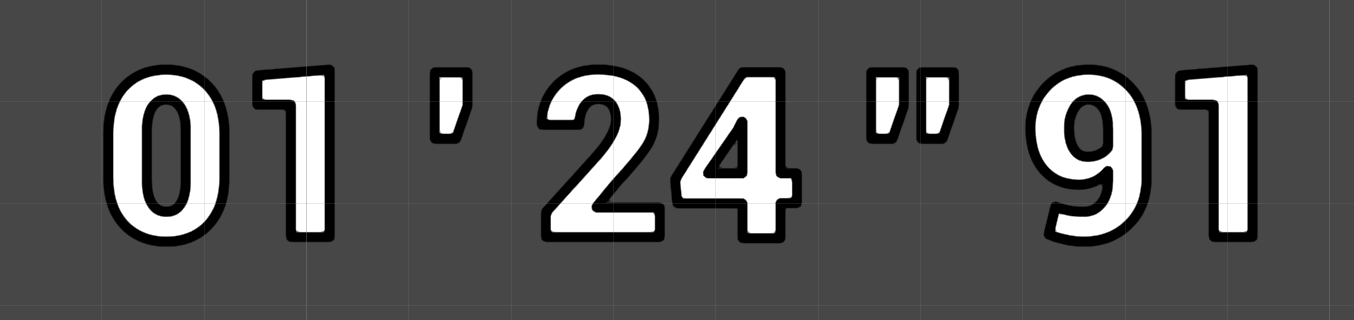
Download the ExtDateTime.cs file below, then use the functions like in this example:
float timeInSeconds = Chrono.GetTimer();    //return eg: 84,91

//convert 84,91 into a structure, once filled,
//it contains 1 minute, 24 seconds, and 91 milliseconds
ExtDateTime.TimeSec timeSec = ExtDateTime.GetTimeSec(timeInSeconds);

//convert the structure into a text 01 ' 24 '' 91. It also handles negative numbers.
string text = ExtDateTime.GetTimeInStringFromTimeSec(timeSec);
ExtDateTime.cs
/// <summary>
/// MIT License - Copyright(c) 2019 Ugo Belfiore
/// </summary>

using UnityEngine;

/// <summary>
/// Extensions for DateTime
/// </summary>
public static class ExtDateTime
{
    public struct TimeSec
    {
        public int Minutes;
        public int Seconds;
        public float Miliseconds;
        public bool IsNegative;

        public TimeSec(int minutes, int seconds, float miliseconds, bool isNegative)
        {
            Minutes = minutes;
            Seconds = seconds;
            Miliseconds = miliseconds;
            IsNegative = isNegative;
        }
    }

    /// <summary>
    /// from a TimeSec, transform it to a string
    /// </summary>
    /// <param name="timeSec"></param>
    /// <returns></returns>
    public static string GetTimeInStringFromTimeSec(TimeSec timeSec)
    {
        string timeInText = "";

        if (timeSec.IsNegative)
        {
            timeInText += '-';
        }

        if (timeSec.Seconds == -1)
        {
            return (timeInText);
        }

        if (timeSec.Minutes < 10)
        {
            timeInText += "0";
        }
        timeInText += timeSec.Minutes;

        timeInText += " ' ";

        if (timeSec.Seconds < 10)
        {
            timeInText += "0";
        }
        timeInText += timeSec.Seconds;

        timeInText += " '' ";

        timeSec.Miliseconds = (int)timeSec.Miliseconds;
        if (timeSec.Miliseconds < 10)
        {
            timeInText += "0";
        }

        if (timeSec.Miliseconds >= 100)
        {
            timeSec.Miliseconds = 99;
        }

        timeInText += timeSec.Miliseconds;
        return (timeInText);
    }

    /// <summary>
    /// Get a TimeSec from a float time in seconds
    /// </summary>
    /// <param name="time">time in seconds</param>
    /// <returns></returns>
    public static TimeSec GetTimeSec(float time)
    {
        float absTime = Mathf.Abs(time);

        int minutes = GetMinutes(absTime);
        int second = GetSeconds(absTime);
        float miliseconds = GetMiliseconds(absTime);
        return (new TimeSec(minutes, second, miliseconds, Mathf.Sign(time) == -1));
    }

    /// <summary>
    /// from a given time, Get the minutes
    /// </summary>
    public static int GetMinutes(float time)
    {
        int minutes = (int)(time / 60);
        return (minutes);
    }
    public static int GetSeconds(float time)
    {
        int seconds = (int)(time % 60);
        return (seconds);
    }
    public static float GetMiliseconds(float time)
    {
        int minutes = GetMinutes(time);
        int seconds = (int)(time % 60);
        return ((time - seconds - (minutes * 60)) * 100f);
    }
}
Source files
See also
- Time, timeScale and deltaTime in the editor: A
TimeEditorclass which mirrors the behavior of theTimeclass in edit mode. Useful for tools that need timers and slow motion. - EditorOnly components and actions when building: Remove components you don't want in the build while keeping them on GameObjects, and execute actions when building your application.